
Key Takeaways
- To limit damage after an Active Directory intrusion, quick detection and a structured response are essential.
- Keeping an eye out for odd activity in Active Directory facilitates early threat detection and efficient incident response.
- Credential recovery, krbtgt rotation, and removal of unwanted accounts are important to regain control and prevent persistence.
- Multi-layered security, including MFA, JIT/JEA, GPO enforcement, and automated monitoring, increases AD defenses post-incident.
- Regular disaster recovery drills, backup testing, and automation ensure readiness and reduce downtime in future Active Directory incidents.
Why Swift Response Matters
A fast, effective response can contain an AD incident, while delays can turn it into a major organizational crisis, including:
- Unauthorized access to confidential data
- Spread of ransomware or malware throughout the network
- Loss of control over administrative privileges
- Operational downtime affecting business continuity
A clear AD response plan is essential to systematically:
- Detect threats before they escalate
- Contain compromised systems
- Recover AD services safely
- Boost defenses to stop attacks in the future
Long downtime, damage to organization’s reputation, and problems with compliance can result from neglecting proactive AD recovery.
- Real-world AD threat detection and response
- Visibility into lateral movement, privilege escalation, and malicious activity
- Actionable insights using network traffic analysis, intelligent deception, and AD monitoring
Understanding Active Directory Compromises
When hackers take advantage of vulnerabilities in the AD environment to obtain unauthorized access or control, Active Directory compromises take place. Implementing a successful Active Directory incident response strategy requires an understanding of these threats’ nature.
Common Attack Vectors
Attackers employ many methods to break into Active Directory environments, including:
| Attack Type | Description | Potential Impact |
|---|---|---|
| Pass-the-Hash (PtH) | Attackers use stolen password hashes to authenticate without knowing the actual password | Unnoticed lateral movement and privilege escalation |
| Kerberos Ticket Forgery | Fake Kerberos tickets are generated to impersonate users | Access to sensitive systems and data without permission |
| DCShadow Attacks | Attackers manipulate the AD replication process to inject malicious changes | Persistent backdoors, hidden admin access, tampered directory data |
| Privilege Escalation | Using vulnerabilities or improperly configured permissions to obtain administrator rights | Complete network management and the option to turn off security monitoring |
Why Early Detection is Crucial
An attacker can do more harm in AD the longer they go unnoticed. An important component of active directory threat response is keeping a watch out for strange activity in AD.
Key indicators of compromise include:
- Sudden creation or deletion of user accounts
- Unexpected privilege changes for standard users
- Logins from unusual locations or devices
- Abnormal replication activity between domain controllers
Monitoring and Response
- Monitor AD logs regularly to spot unusual activity.
- Use analytics tools to detect abnormal behavior.
- Integrate with SIEM/XDR for warnings and automated reactions.
Effective active directory response and recovery are based on early identification and organized incident response.
Let’s go through the step-by-step response and recovery process for Active Directory compromises.
Immediate Response After Detection
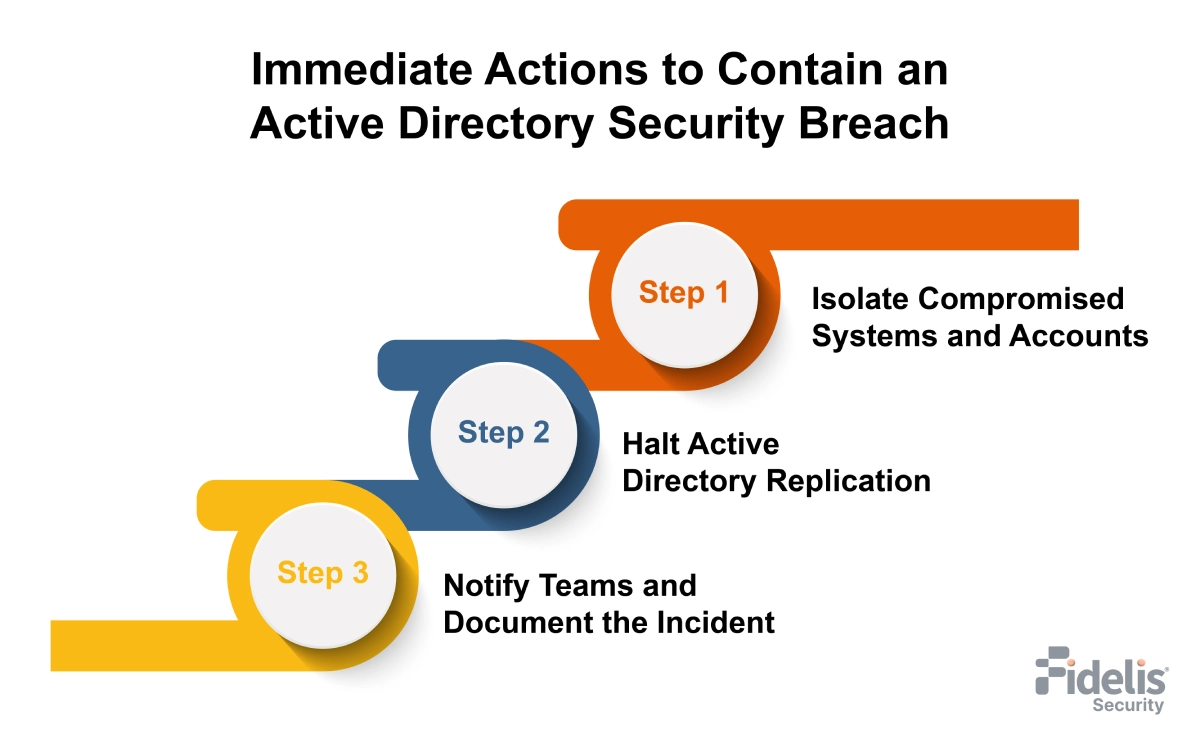
Quick action is essential to contain a potential Active Directory compromise and prevent further damage. Each step is executed carefully through a structured Active Directory threat response procedure.
Step-by-Step Immediate Actions
1. Isolate Compromised Systems and Accounts
- Disconnect affected machines from the network to prevent lateral movement.
- Disable compromised user accounts and any active sessions.
- Temporarily block domain admin access if unusual activity is detected.
- For automated isolation, make use of Endpoint Detection and Response (EDR) solutions.
2. Stop AD Replication
- Pause replication between domain controllers to stop malicious changes.
- Resume replication only after systems are confirmed clean.
3. Notify Security Teams and Stakeholders
- Alert the internal security operations team immediately.
- Inform IT, management, and compliance.
- Keep track of every action for review and auditing.
Tools and Alerts for Real-Time Detection
| Tool / Solution | Purpose | Notes |
|---|---|---|
| SIEM Platforms | Aggregate logs and trigger alerts for suspicious AD activity | Can automate alerting and workflows |
| EDR Solutions | Isolate compromised endpoints and monitor malware activity | Provides automated response to contain attacks |
| Behavioral Analytics Tools | Find variations from the average user behavior | Helpful in identifying covert or insider assaults |
Using a standardized response checklist limits spread and ensures effective investigation and recovery.
Investigation and Forensics
A thorough investigation to ascertain how the issue happened and which systems or accounts were impacted is an essential next step following early containment. This is a key part of active directory incident response.
-
Conduct Forensic Analysis
- Look for unusual logins, unsuccessful authentication attempts, and permission changes in event logs and Event Viewer entries.
- Check Kerberos tickets for indications of fraud.
- To find malicious commands or attempts at lateral movement, examine PowerShell history and script execution.
-
Identify Root Cause
- Find how the initial access occurred (phishing, stolen credentials, or weak permissions).
- Identify affected accounts and systems.
- See how attackers gained higher privileges or bypassed security.
Map Attacker Movement and Privilege Abuse
Creating a visual map of the attack helps understand the scope and potential impact:
| Step | Analysis Focus | Outcome |
|---|---|---|
| Entry Point | Initial compromise method | Identify weak vectors to patch |
| Lateral Movement | Access to other systems or domains | Highlight at-risk endpoints |
| Privilege Escalation | Accounts with elevated permissions | Determine accounts with domain admin privileges for credential rotation |
| Persistence | Backdoors or scheduled tasks | Remove persistent threats |
-
Importance of Monitoring
- Continuous AD monitoring helps detect hidden attacks early.
- It also lets teams fine-tune defenses and prepare automated recovery.
Credential Recovery and Access Remediation
Credential recovery is critical after an AD incident to prevent persistence. Automation speeds recovery and reduces human error.
1. Reset or Revoke Compromised Credentials
- All potentially affected accounts should have their passwords reset.
- Focus first on high-privilege domain admin accounts.
- Disable any temporary or suspicious accounts.
- Make sure all important accounts have MFA enabled.
2. Rotate Kerberos Ticket-Granting Ticket (krbtgt) Passwords
- The krbtgt account is used to issue Kerberos tickets. If compromised, it can allow attackers to create Golden Tickets.
-
Best practice is to rotate the krbtgt password twice:
- First rotation invalidates any existing tickets.
- Second rotation ensures full invalidation and prevents the reuse of stolen credentials.
3. Remove Unauthorized Accounts and Access Rights
- Audit all user and administrative accounts to detect unusual privileges.
- Remove accounts that were created without authorization.
- Limit all accounts to only the access they need.
- Record every change for compliance and review.
4. Automate Recovery Where Possible
Check the tasks to be automated:
| Recovery Task | Automation Opportunity |
|---|---|
| Password resets | Batch reset via scripts or AD automation |
| Privilege audits | Scheduled reports on group membership changes |
| Account deactivation | Deactivation of questionable or inactive accounts automatically |
| krbtgt rotation | Secure, scheduled rotation without downtime |
Automating repetitious recovery tasks ensures consistency, reduces error risk, and speeds up the return to regular operations.
Active Directory Database Recovery
Safe AD database recovery restores operations and protects data, while a solid disaster recovery plan prevents reintroducing compromised elements.
Check the following steps:
1. Verify Backups and Ensure Integrity
- Verify that backups are free of malware, clean, and unchanged.
- Use offline or immutable backups to avoid reinfection.
- Use integrity checks or test restores to confirm backups.
2. Step-by-Step Restoration Process
-
Step 1: Prepare for Recovery
- Isolate the target domain controller.
- Disable network replication temporarily to prevent spreading compromised objects.
-
Step 2: Restore AD Database
Use authoritative or non-authoritative restore based on the incident scope:- Authoritative restore: Ensures certain objects are treated as the “source of truth,” overwriting replication.
- Non-authoritative restore: Restores the domain controller to the state of the backup, then allows replication to update changes.
-
Step 3: Post-Restoration Validation
- Check that all domain controllers have synchronized correctly.
- Check key services (authentication, GPO, DNS) are working.
- Run scans to ensure no malware remains.
Key Recommendations
| Focus Area | Action |
|---|---|
| Backup Frequency | Daily system state backups for domain controllers |
| Test Recovery | Regular disaster recovery drills to validate procedures |
| Logging & Monitoring | Monitor restored AD for signs of post-restore compromise |
| Documentation | Record all restoration steps and decisions for audits |
Following a disciplined AD database recovery approach saves downtime, protects integrity, and creates the foundation for increased security post-incident.
Implementing Multi-Layered Active Directory Security
After recovery, strengthening AD with a multi-layered security approach reduces attack surface, limits lateral movement, and helps prevent future breaches.
-
Multi-Factor Authentication (MFA)
- Use MFA for all high-privilege and service accounts.
- Apply MFA to remote access and cloud-connected AD services.
-
Just-in-Time (JIT) and Just-Enough-Administration (JEA) for Privileged Access Management
- JIT gives admin rights only when needed.
- JEA limits admins to specific tasks.
-
Group Policy Object (GPO) Enforcement and Auditing
- Use strict GPOs to manage permissions, security settings, and software.
- Audit GPO changes regularly to catch unauthorized updates.
-
Continuous Monitoring and Automated Alerts
- Monitor logins, privilege changes, and replication activity in real time.
- When questionable activity is noticed, send out immediate alerts.
- Automate routine actions like account lockdowns or privilege changes.
| Security Layer | Action | Automation Opportunity |
|---|---|---|
| Authentication | MFA, strong passwords | Conditional access policies |
| Privilege Management | JIT/JEA, PoLP | Auto-assignment and expiry of temporary roles |
| Policy Enforcement | GPO auditing | Automated compliance reports |
| Threat Monitoring | Event logs, SIEM alerts | Auto-isolation of suspicious accounts |
A multi-layered strategy guarantees that vital AD assets are protected even in the event that one protection fails.
Post-Recovery Monitoring and Automation
Restoring AD is just half the fight. Reinfection can be avoided, and the response to possible threats can be accelerated with automation and ongoing monitoring.
1. Continuous Monitoring
- Watch for strange logins, admin activities, and permission changes.
- Monitor trust relationships and replication for unexpected behavior.
- Focus on AD-specific indicators of compromise.
2. Automated Threat Detection and Response
React to questionable occurrences with automation:
- Lock or disable compromised accounts immediately.
- Trigger notifications to security teams.
- Record incidents for post-analysis.
3. Integrating SIEM/XDR Platforms
- Centralize AD logs in SIEM or XDR solutions for correlation across systems.
-
Detect complex attack patterns by combining:
- Authentication anomalies
- Privilege misuse
- Network behavior deviations
Benefits: Proactive active directory threat response and faster containment of emerging attacks.
Strengthening Active Directory Defense with Fidelis Active Directory Intercept™
Effective AD response needs constant monitoring and fast, automated threat detection. Fidelis Active Directory Intercept™ combines AD-aware NDR with deep AD monitoring to detect and stop attacks early.
How Fidelis Helps Secure Active Directory
- Real-time AD log and event monitoring to detect abnormal logins, privilege escalation, and replication abuse
- Deep traffic inspection combined with AD-aware NDR to find covert and disguised attacks
- Integrated intelligent deception to expose lateral movement and disrupt attacker activity
- Response playbooks and automated warnings to speed up containment and inquiry
Key Benefits
- Faster detection of AD threats across network and identity layers
- Improved visibility into AD objects, permissions, and misconfigurations
- Shorter dwell time for attackers and a decreased chance of recurrent compromise
Integrating Fidelis Active Directory Intercept™ shifts AD security from reactive recovery to proactive, multi-layered defense.
Testing and Maintaining an Active Directory Disaster Recovery Plan
Your company may swiftly recover from future events without data loss or downtime if it has a strong active directory disaster recovery plan. Maintenance and testing are essential.
-
Periodic Disaster Recovery Drills
- Run drills for ransomware, domain controller failure, or credential compromise.
- Train IT and security teams on recovery roles.
-
Test Backup Restorations
- Test backups regularly to ensure they are clean and complete.
- After restoration, confirm AD authenticity, replication, and integrity.
-
Update Response and Recovery Playbooks
- Apply lessons from drills and incidents.
- Keep credential recovery, database restoration, and threat containment steps updated.
- Use AD recovery automation to cut errors and speed recovery.
| Plan Component | Best Practice |
|---|---|
| Backup Frequency | Daily system-state backups for DCs |
| Restoration Testing | Quarterly sandbox restores |
| Playbook Review | Annual updates + post-incident revision |
| Automation | Scripted restores, password rotations, and alerts |
Routine testing and updates keep your disaster recovery plan prepared for evolving AD risks.
Conclusion
A structured AD response and recovery process limits damage and restores operations after a compromise. Continuous monitoring, automation, and layered security enable faster detection, effective response, and reduced future risk. Regular preparation and updates ensure resilience against evolving AD threats.
Frequently Ask Questions
What is an Active Directory compromise?
An Active Directory compromise occurs when attackers exploit weaknesses to gain unauthorized access. Common attacks include Pass-the-Hash, Kerberos ticket forgery, DCShadow, and privilege escalation. Early detection limits damage.
What are the first steps after detecting an AD compromise?
Immediate steps include isolating affected systems and accounts, stopping AD replication to limit spread, and alerting security teams. EDR and SIEM tools help automate containment and alerts.
How do you recover compromised credentials in AD?
Reset affected passwords, rotate the krbtgt account twice, remove unauthorized accounts, and enforce MFA. Automation reduces errors and speeds recovery.
What is the best approach to restore an AD database safely?
Confirm backups are clean, select the appropriate restore method, isolate domain controllers, restore AD, and validate replication and services. Regular testing ensures readiness.
How can organizations prevent future AD compromises?
Use layered AD security with MFA, JIT/JEA, GPO enforcement, continuous monitoring, and automated response. Regular drills and updated playbooks improve resilience.