
As 98% of businesses[1] are using some form of cloud computing, keeping track of who has access to what has become a major challenge, especially as cloud environments often span multiple platforms and locations.
What is Azure Active Directory?
Azure Active Directory is Microsoft’s solution for user identity and permission management. It functions as a digital gatekeeper, limiting access to your cloud apps and services.
Azure AD ensures the authorized persons have access whenever they need it. This is particularly essential in the complicated landscapes of information technology today, where you might have a mixed setting of cloud and on-premises systems.
How Azure Active Directory Works?
Think of your digital world as a city. Where everyone will be busy with other tasks, Azure AD stands at the intersections as a traffic cop, making sure everyone arrives at their destination securely and on time. It monitors who should be in the city, what they can do, and where they can go.
Specific things that it does:
- Creates user accounts, groups, and roles so that everybody has proper access.
- Determines who can access which system and what task they can perform.
- Make sure that the users are who they claim to be through passwords, multi-factor authentication, or even some sort of biometric authentication.
- Stores information about users, groups, and devices.
- Integrate with other Microsoft products since it works with Microsoft 365, Dynamics 365, and all other Microsoft services.
- Has inbuilt security features like Identity Protection, Privileged Identity Management (PIM), and Conditional Access, which can help you fight against identity-based threats.
Key Features of Azure AD
| Feature | Description |
|---|---|
| Single Sign-On | Let users authenticate themselves once after which they can access multiple applications without having to re-enter their credentials. |
| Multi-Factor Authentication | Users must verify their identity using a second mode of authentication like mobile app or biometric data. |
| Conditional Access | Let organizations set up rules that determine who can access what resources under which conditions. |
| Identity Protection | Detects and responds to potential security threats using AI-driven insights. |
How Azure AD Differs from On-Premises Active Directory
While Azure AD and traditional on-premises Active Directory (AD) share common ground with respect to the handling of identities and access, there are huge differences between them.
- Cloud-based vs. On-premises: Azure AD was designed for the cloud environment. It provides identity services across many platforms and networks, while on-premises AD is mainly utilized to control access permissions to a physical network.
- Protocols: Azure AD supports the latest authentication protocols, such as OAuth and OpenID Connect, which are required for cloud applications. Protocols that are in place with on-premises AD are the older ones, like Kerberos and NTLM.
- Scalability: Azure AD is designed to handle many identities and resources that enable businesses to scale without putting in much effort as they grow. On-premises AD requires physical infrastructure and may struggle to scale in large and complex environments.
- Integration: Tight integration of Azure AD with Microsoft cloud services, plus the fact that it supports thousands of third-party SaaS applications, makes the tool very powerful for modern businesses. This lacks within an on-premises AD; it often requires additional tools and configurations to integrate with cloud services.
- Continuous Visibility
- Ensure Compliance Against Misconfiguration
- Proactive AD Defense

Now that we have seen how Azure AD works and how it is different from the on-premises AD. Let’s see if it is secure enough.
How Secure is Azure Active Directory?
Azure AD is based on strong security standards and uses Microsoft’s Zero Trust security concept. This is very important in the security environment today, given that cyber-attacks are sophisticated and targeted as never before. This Zero Trust strategy suggests that any access attempt could be malicious and therefore needs verification at every step.
Zero Trust Principles in Azure Active Directory:
- Strong Verification: Validate and permit every piece of information in the pipeline at all times be it user identifications, location, health statuses of devices, and service/workload. It, therefore, ensures the complete verification of all elements in Azure AD, with the help of functionalities like Conditional Access and MFA.
- Use Least Privilege Access: Access by all users should be restricted based on just-enough-access and just-in-time, respectively. This helps limit a user’s access to only what is needed by them to complete their tasks, reducing the possible damage that could occur from breaches in their accounts.
- Assume Breach: Azure AD operates on the assumption that an attack could be happening at any given moment, highlighting the importance of early threat detection and rapid action.
In short, Azure AD is designed to keep your data safe in today’s dangerous digital world.
Common Threats to Azure Active Directory
Being the digital gatekeeper of many organizations, Azure Active Directory has become a primary target for cybercriminals. Some common threats against Azure AD include:
- Credential Theft: Credential Theft: As is often the case, phishing, among other social engineering techniques, is used by hackers to steal user credentials. Once they obtain the user’s credentials, they can log into their accounts and further compromise the entire network.
- Brute Force Attack: This attack involves the use of algorithms that guess passwords through the trying of all possible combinations one after the other. This type of attack is usually successful against weak or common passwords.
- Password Spray Attack: Unlike the brute force attack, which concentrates on one account, a password spray attack tries a few common passwords against many accounts. This approach often works because many users use easy or common passwords.
- Misconfiguration Vulnerabilities: This is because of the misconfigured settings of Azure AD, such as very permissive access policies or even unmonitored privileged accounts. In this way, security loopholes are exposed that attackers can exploit.
- Token Stealing: The OAuth token and refresh tokens can be hijacked and used to bypass MFA. This gives an attacker access to resources, even if the attacker doesn’t have access to the user’s credentials directly.
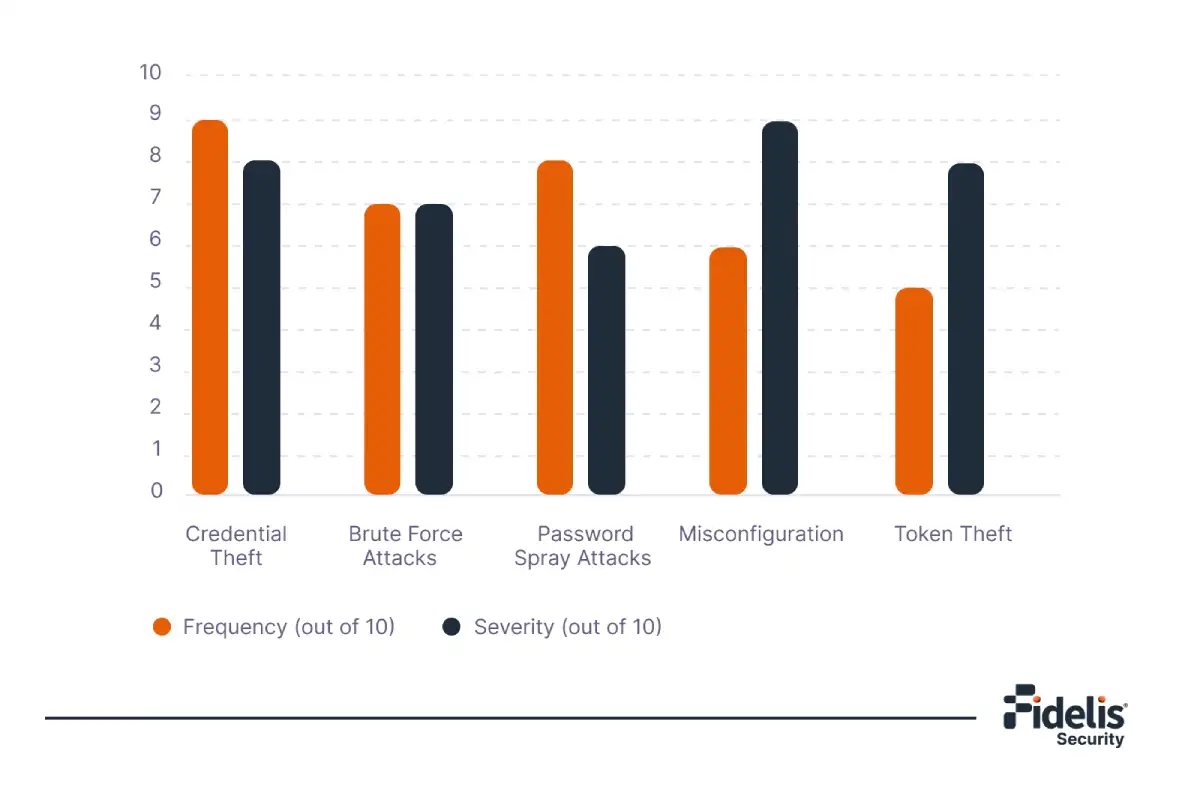
Remember, even the best security measures can't protect you if you're not careful.
How to Secure Azure Active Directory?
The protection of Azure AD is a multi-layered approach, a combination of built-in features with additional security measures and best practices. Below are some ways an organization could use to make Azure AD more secure.
Enforce Multi-Factor Authentication: Secure everyone’s account with MFA. The use of MFA greatly reduces the chances of unauthorized access by requiring a secondary form of access verification.
Conditional Access: With conditional access policies, set up to enforce rigorous limits based on real-time risk variables like the location of the user or device and patterns of behavior.
Monitoring and Responding to Threats: Azure AD’s Identity Protection function is intended to make it easier to identify and respond to suspicious activities. Using sign-in patterns and other indicators, it can detect high-risk sign-ins and take measures like requiring MFA or blocking access.
Use Privileged Identity Management: PIM acts in a way that exercises fine-grained control over privileged accounts, allowing access only when necessary and only for a limited time. It reduces the risk of compromise of privileged accounts.
Review Access Rights Regularly: Review accesses periodically to ensure they are still relevant to the job roles. This prevents privilege creep, where users acquire access permissions over time that they no longer require.
Best Practices for Azure AD Security – Checklist
These best practices are very instrumental in keeping tight security posture within Azure AD. This set of best practices, all checked, lowers the risk of unauthorized access, data breaches, and other security-related events.
Core Security Practices
- Set up Multi-Factor Authentication (MFA)
- Implement Conditional Access Policies
- Implementing Role-Based Access Control (RBAC)
- Use Azure AD Privileged Identity Management (PIM)
- Regularly Monitor Sign-In Activity
- Automate Identity Governance
Advanced Security Practices
- Use Azure Advanced Threat Protection (ATP)
- Integrate with SIEM Solutions
- Consider a Cloud Access Security Broker (CASB)
- Implement Password less Authentication
- Regularly Patch & Update
- Use Fidelis Active Directory Intercept™ for enhanced threat detection and response.
Conclusion
Azure Active Directory is like the foundation of a strong digital castle, holding on to two of the most important keys – who can enter and what they can do, within a cyber threat landscape where the attackers seem constantly to be trying out new tricks. Because of this, a multi-layered security plan has grown quite important in today’s modern world. Features and best practices in Azure AD form quite a strong arsenal for you to fight back against notorious tricksters.
There are additional tools that you should consider using to further reinforce the walls of your castle, like Fidelis Elevate. It is like having additional guards placed along the ramparts to watch for suspicious activity. It can help detect and block even the advanced threats before they can act to do damage. With intelligent detection and fast response, Fidelis keeps your organization secure from inside and outside attacks on Azure AD.
- AD-aware Network Traffic Analysis
- Log and Event Monitoring
- Integrated Deception

Frequently Asked Questions
How can we monitor and respond to security incidents in Azure AD?
Azure AD Identity Protection: Detects suspicious activities like unexpected sign-ins and automatically enforces security measures like multi-factor authentication or password reset.
Azure Security Center: Provides you with a complete view into your workload’s security state and gives real-time alerting and recommendations.
Fidelis Active Directory Intercept ™: It can enhance Azure Active Directory security by providing advanced threat detection and automated response, thus enabling proactive monitoring and quick response to suspected breaches.
How can we stay updated on evolving threats and best practices for Azure AD security?
- Microsoft Security Blog: Stay updated on risks and best practices for Azure AD and other Microsoft Services.
- Azure AD Documentation: Microsoft updates Azure AD documentation with the latest guidance, security best practices, and new features as they are released.
- Security Conferences and Webinars: Keep updated by visiting industry conferences like Microsoft Ignite or webinars on Azure security.