


Summary
CVE-2026-21509 is a high-severity Microsoft Office flaw that lets attackers bypass built-in protections when a user opens a malicious document. It affects Office 2016, 2019, LTSC 2021/2024, and Microsoft 365 on x86/x64 systems, is actively exploited in the wild, and requires immediate patching following Microsoft’s January 26, 2026, update.
Urgent Actions Required
- Deploy Microsoft’s emergency out-of-band Office security update released on January 26, 2026, across all affected versions without delay.
- Restart all Microsoft Office applications (Word, Excel, PowerPoint, Outlook) on every system to ensure updated security mitigations are activated.
- For environments using Office 2016 and 2019, apply the documented Windows Registry mitigation to block the vulnerable Office object and reboot systems.
- Strengthen Outlook defenses by disabling automatic previews, blocking external content loading, and enforcing Protected View for attachments.
- Increase vigilance against phishing by training users to avoid opening unexpected documents and by monitoring for suspicious Office activity and exploitation attempts.
Which Systems Are Vulnerable to CVE‑2026‑21509?
Technical Overview
- Vulnerability Type: Security Feature Bypass via Untrusted Input Handling (CWE-807)
-
Affected Software/Versions:
- Microsoft Office 2016 (x86/x64)
- Microsoft Office 2019 (x86/x64)
- Office LTSC 2021 (x86/x64)
- Office LTSC 2024 (x86/x64)
- Microsoft 365 Apps for Enterprise (x86/x64)
-
CVSS Vector: v3.1
- Attack Vector: Local
- Attack Complexity: Low
- Privileges Required: None
- User Interaction: Required
- Scope: Unchanged
- Confidentiality Impact: High
- Integrity Impact: High
- Availability Impact: High
-
Patch Availability: Yes, available
CVE-2026-21509 - Security Update Guide - Microsoft - Microsoft Office Security Feature Bypass Vulnerability
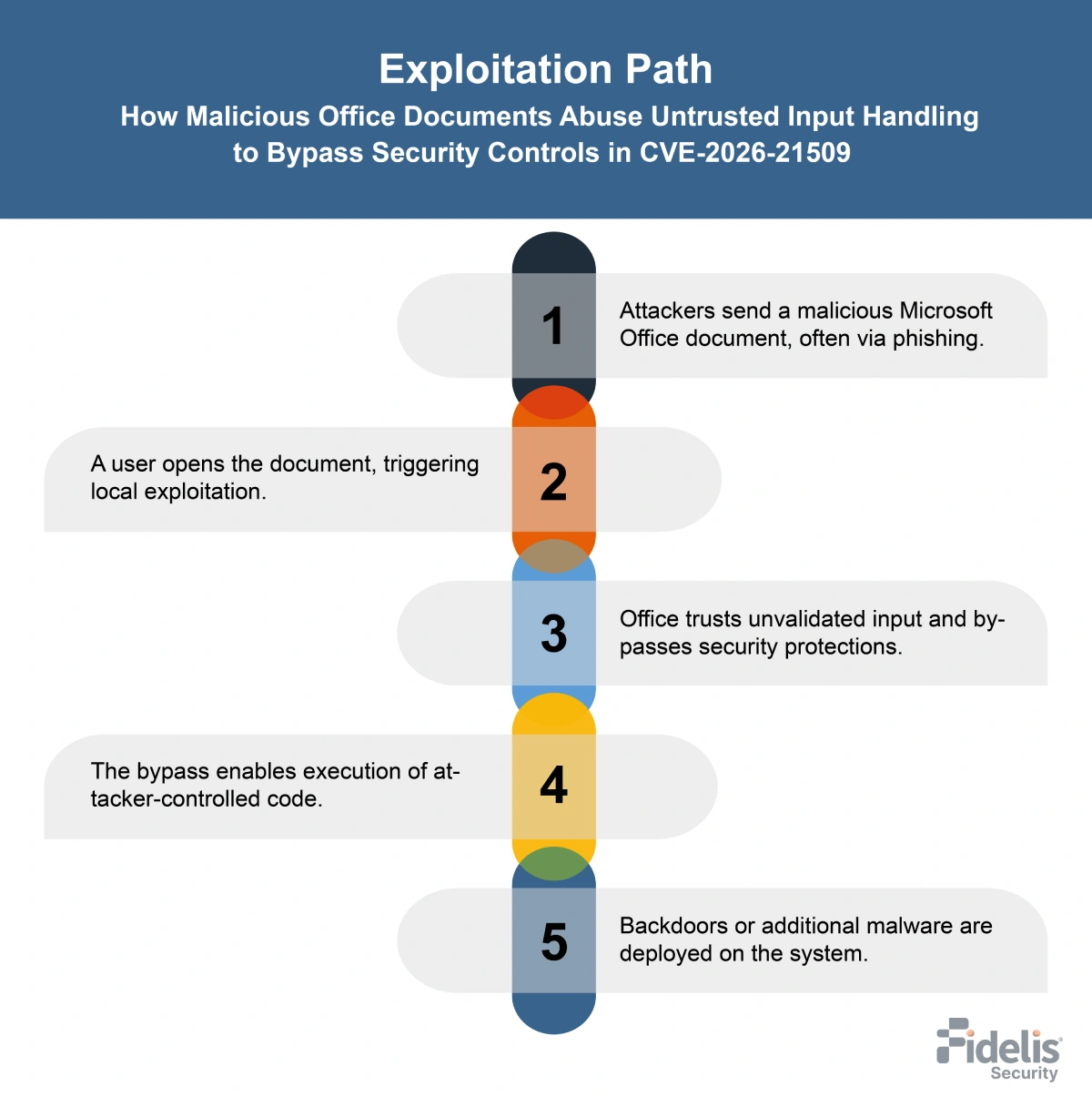
How Does the CVE‑2026‑21509 Exploit Work?
The attack typically follows these steps:
What Causes CVE‑2026‑21509?
Vulnerability Root Cause:
The reason for CVE-2026-21509 is that malicious documents can get past security checks because Microsoft Office accepts unvalidated input. By opening a crafted file, an attacker can circumvent OLE/COM security measures and cause dangerous behavior.
How Can You Mitigate CVE‑2026‑21509?
If immediate patching is delayed or not possible:
- Restart all Microsoft Office applications to activate Microsoft’s service-side protections for supported versions (Microsoft 365, Office 2021 and later).
- Use the suggested registry patch for Office 2016 and 2019 (make a registry backup beforehand).
- Enforce Outlook Protected View and block automatic external content.
- Warn users to avoid opening unexpected or suspicious Office documents.
- Monitor systems for suspicious Office activity, such as unusual DLL loading or behavior following document opening, as highlighted in active exploitation reports.
Which Assets and Systems Are at Risk?
-
Asset Types Affected:
- Microsoft Office Applications – Word, Excel, PowerPoint, and Outlook in affected versions (Office 2016, 2019, LTSC 2021, LTSC 2024, and Microsoft 365 Apps for Enterprise)
- Email Attachments – Malicious Office documents delivered via phishing or other social engineering channels
- Local Systems – User machines where Office is installed and a malicious file can be opened
-
Business-Critical Systems at Risk:
- Government Agencies – Targeted in espionage-focused attacks leveraging this vulnerability
- Enterprise Environments – Especially organizations handling sensitive or classified data
- Critical Infrastructure and Maritime/Transport Sectors – Observed targets of active exploitation campaigns
-
Exposure Level:
- Internet-Connected Workstations – Receiving email attachments or shared files from external sources
- Internal Networks – Users opening malicious files from shared folders or cloud-synced drives
- Enterprise Email Systems – Phishing campaigns can deliver the malicious Office documents
Will Patching CVE‑2026‑21509 Cause Downtime?
Patch application impact: Low. Microsoft’s emergency update activates with an Office app restart for Microsoft 365 and Office 2021+. Office 2016 and 2019 may require a registry change and system restart.
How Can You Detect CVE‑2026‑21509 Exploitation?
-
Exploitation Signatures:
Exploitation starts when a user opens a malicious Office document sent via phishing or targeted emails. Attacks rely on abusing Office OLE/COM components after security protections are bypassed. -
Indicators of Compromise (IOCs/IOAs):
- Malicious Word or Office documents that are sent to you over email and are frequently disguised as professional correspondence, reports, or bills
- Office processes initiate unexpected network connections, including WebDAV-based downloads
- Creation of suspicious DLL files masquerading as legitimate components (for example, files posing as system shell extensions)
- Presence of unusual image files used to store or trigger embedded shellcode
- Registry modifications linked to COM component hijacking
- Scheduled tasks created to relaunch Windows Explorer or maintain persistence
- Office applications spawning abnormal child processes or executing follow-on payloads
-
Behavioral Indicators:
- Office document execution followed by abnormal DLL loading behavior
- COM hijacking activity causing malicious code to load when Windows Explorer starts
- Use of legitimate cloud storage services for command-and-control traffic
- Repeated Office crashes or instability after opening documents
- Persistence mechanisms established shortly after document interaction
-
Alerting Strategy:
- Priority: High
- Trigger alerts for:
- Alert on Office applications exhibiting abnormal DLL loading or registry changes
- Flag scheduled task creation tied to Explorer or Office execution paths
- Monitor for Office-originated network traffic to external file-sharing or cloud storage services
- Correlate phishing email delivery with subsequent Office process anomalies
Remediation & Response
-
Remediation Timeline:
- Immediate: Install Microsoft’s emergency Office update (Jan 26, 2026).
- Short term: Restart Office apps to enable protections.
- ASAP: Apply the registry mitigation for Office 2016 and 2019 until fully patched.
-
Rollback Plan:
- If patching causes issues, follow standard rollback procedures while keeping Microsoft-recommended mitigations in place.
- Confirm registry backups exist before reverting any changes.
-
Incident Response Considerations:
- Identify systems where Office documents were opened prior to patching, especially those received via email.
- Review endpoint activity for signs of exploitation following document execution, including abnormal Office behavior noted in active exploitation reports.
- Prioritize investigation of systems in government, enterprise, or high-value environments, given confirmed targeted attacks.
- After remediation, continue monitoring Office activity to confirm protections remain active and no further exploitation attempts occur.
Compliance & Governance Notes
-
Audit Trail Requirement:
- Maintain records of patch deployment or mitigation actions, including:
- Date and time of update or mitigation
- Affected Office versions and platforms
- Document registry-based mitigations applied to Office 2016 and 2019 systems, including confirmation of registry backups.
- Track Office application restarts performed to activate service-side protections for Microsoft 365 and Office 2021+.
- Maintain records of patch deployment or mitigation actions, including:
-
Policy Alignment:
- Ensure vulnerability handling aligns with internal vulnerability remediation procedures, given confirmed exploitation and KEV inclusion.
- Validate that interim mitigations remain in place for Office versions awaiting final patches.
- Review exposure in end-of-life or unsupported Office environments.
CVSS Breakdown Table
| Metric | Value | Description |
|---|---|---|
| Base Score | 7.8 | High-severity vulnerability with significant security impact |
| Attack Vector | Local | Exploitation requires local access via opening a malicious Office document |
| Attack Complexity | Low | The attack is straightforward and does not depend on special conditions |
| Privileges Required | None | No prior authentication or elevated privileges are needed |
| User Interaction | Required | A user must open a specially crafted Office file |
| Scope | UnChanged | Impact remains limited to the affected Office component |
| Confidentiality Impact | High | Successful exploitation can expose sensitive information |
| Integrity Impact | High | Allows manipulation of data or bypass of Office security controls |
| Availability Impact | High | Exploitation may significantly disrupt system or application availability |
Keep Exploring
Detailed insights into critical and emerging CVEs