
Summary
CVE-2025-41236 is a flaw in VMware’s VMXNET3 virtual NIC that can be abused by an administrator inside a guest VM to run code on the underlying host. Systems that do not use VMXNET3 are not exposed. The vendor rates this issue Critical with a 9.3 base score. No workarounds are provided; upgrading to fixed builds is required.
Urgent Actions Required
- Apply the latest VMware security updates for ESXi 7.0, ESXi 8.0, Workstation, and Fusion that resolve CVE-2025-41236.
- Give priority to patching internet-facing virtual machines that use the VMXNET3 adapter.
- Since no workaround exists, updating to the fixed versions is the only effective safeguard.
Which Systems Are Vulnerable to CVE-2025-41236?
Technical Overview
- Vulnerability Type: Integer Overflow in VMXNET3 Virtual Network Adapter
-
Affected Software:
- VMware ESXi
- Fixed in: 8.0 Update 3f (Build 24784735)
- Fixed in: 7.0 Update 3w (Build 24784741)
- VMware Workstation Pro
- Fixed in: 17.6.4
- VMware Fusion
- Fixed in: 13.6.4
- Attack Vector: Local (requires administrative access on a virtual machine with VMXNET3 adapter)
- CVSS Score: 9.3
-
CVSS Vector: CVSS:3.1
- Attack Vector: Local
- Attack Complexity: Low
- Privileges Required: None
- User Interaction: None
- Scope: Changed
- Confidentiality Impact: High
- Integrity Impact: High
- Availability Impact: High
- Patch Availability: Yes, available[1] [2]
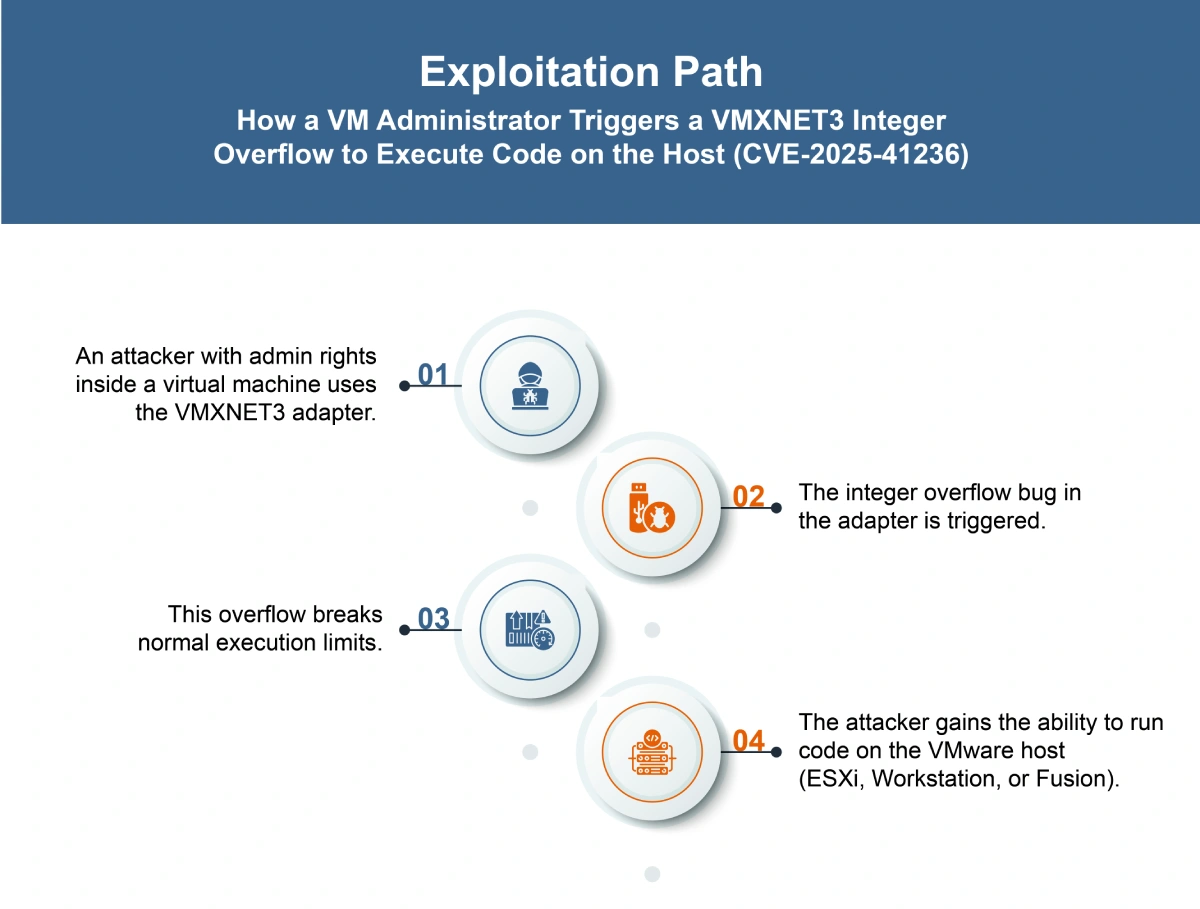
How Does the CVE-2025-41236 Exploit Work?
The attack typically follows these steps:
What Causes CVE-2025-41236?
Vulnerability Root Cause:
This flaw arises from an integer overflow in the VMXNET3 virtual network adapter used in VMware ESXi, Workstation, and Fusion. The weakness allows a local administrator on a virtual machine to trigger the overflow, breaking isolation and enabling code execution on the underlying host system.
How Can You Mitigate CVE-2025-41236?
If immediate patching is delayed or not possible:
- Restrict or monitor access for users with administrative privileges inside virtual machines.
- Isolate high-risk or untrusted workloads to reduce exposure.
- Increase host-level logging and monitoring to detect unusual VM-to-host activity.
- Limit the number of users with VM administrative rights wherever feasible.
Which Assets and Systems Are at Risk?
Asset Types Affected:
- VMware ESXi
- VMware Workstation
- VMware Fusion
Business-Critical Systems at Risk:
- Virtualized data centers relying on ESXi for production workloads
- Developer and testing environments using Workstation or Fusion
- Systems hosting sensitive applications where VM-to-host isolation is critical
Exposure Level:
- Hosts running unpatched VMware products where local VM administrators are present
- Multi-tenant virtualization setups where different users or teams share the same host
Will Patching CVE-2025-41236 Cause Downtime?
Patch application impact: Low. Applying the patches resolves the vulnerability without significant operational disruption. Standard update and reboot cycles may be required, but downtime is expected to be minimal when scheduled properly.
How Can You Detect CVE-2025-41236 Exploitation?
Indicators of Compromise (IOCs/IOAs):
- VMXNET3 adapter in use (only affected config).
- Host instability, VMX process crashes, or abnormal behavior triggered by guest activity.
- Signs of guest-origin code executing on the host.
- Hosts running unpatched ESXi, Workstation, or Fusion builds listed in VMware’s advisory.
Alerting Strategy:
- Trigger alerts for:
- New/abnormal host processes tied to VM activity.
- Host crashes or errors correlated with VMXNET3 traffic.
- Unpatched hosts detected in environment.
Remediation & Response
Patch/Upgrade Instructions:
- Patch/Upgrade Instructions:
Remediation Timeline:
- Immediate: Review inventory and identify systems using VMXNET3 adapters
- As soon as possible: Apply VMware’s security updates to all affected environments.
Incident Response Considerations:
- Monitor for VMX process crashes or unusual VM behavior, as noted in the advisory.
- Validate that all hosts running VMXNET3 are updated to fixed versions.
- Collect host and VM logs for signs of instability during the vulnerable window.
Compliance & Governance Notes
Policy Alignment:
- Update internal vulnerability management policies to ensure timely deployment of VMware security updates.
- Verify that all systems running VMXNET3 adapters are included in patch compliance checks.
CVSS Breakdown Table
| Metric | Value | Description |
|---|---|---|
| Base Score | 9.3 | Indicates severe risk with high confidentiality, integrity, and availability impact |
| Attack Vector | Local | Exploitation requires local access to the affected system |
| Attack Complexity | Low | No special conditions or advanced techniques are needed |
| Privileges Required | None | Attack can be executed without authentication or prior access |
| User Interaction | None | Exploitation does not rely on user actions |
| Scope | Changed | A successful exploit can affect other components beyond the initially compromised one |
| Confidentiality Impact | High | Sensitive information may be fully exposed |
| Integrity Impact | High | Data and system integrity may be completely compromised |
| Availability Impact | High | Exploit can result in full denial of service or system shutdown |