
Summary
A FortiWeb path traversal vulnerability known as CVE-2025-64446 allows unauthenticated attackers to execute admin commands through specially constructed HTTP/HTTPS requests. Attacks are ongoing, and there are public PoCs. The most recent releases include fixes for affected versions 7.0.0–8.0.1. Until a patch is applied, Fortinet recommends turning off internet-facing HTTP and HTTPS and keeping an eye on logs.
Urgent Actions Required
- Update FortiWeb to the patched versions: 8.0.2, 7.6.5, 7.4.10, 7.2.12, or 7.0.12.
- Disable HTTP/HTTPS on internet-facing interfaces until systems are updated.
- Review configurations and logs after upgrading to identify any unexpected or unauthorized administrative changes.
Which Systems Are Vulnerable to CVE-2025-64446?
Technical Overview
- Vulnerability Type: Relative Path Traversal leading to Administrative Command Execution
-
Affected Software/Versions:
- Fortinet FortiWeb 8.0.0 – 8.0.1
- Fortinet FortiWeb 7.6.0 – 7.6.4
- Fortinet FortiWeb 7.4.0 – 7.4.9
- Fortinet FortiWeb 7.2.0 – 7.2.11
- Fortinet FortiWeb 7.0.0 – 7.0.11
- Attack Vector: Network (HTTP/HTTPS)
- CVSS Score: 9.8
-
CVSS Vector: v3.1
- Attack Vector: Network
- Attack Complexity: Low
- Privileges Required: None
- User Interaction: None
- Scope: Unchanged
- Confidentiality Impact: High
- Integrity Impact: High
- Availability Impact: High
- Patch Availability: Yes, available
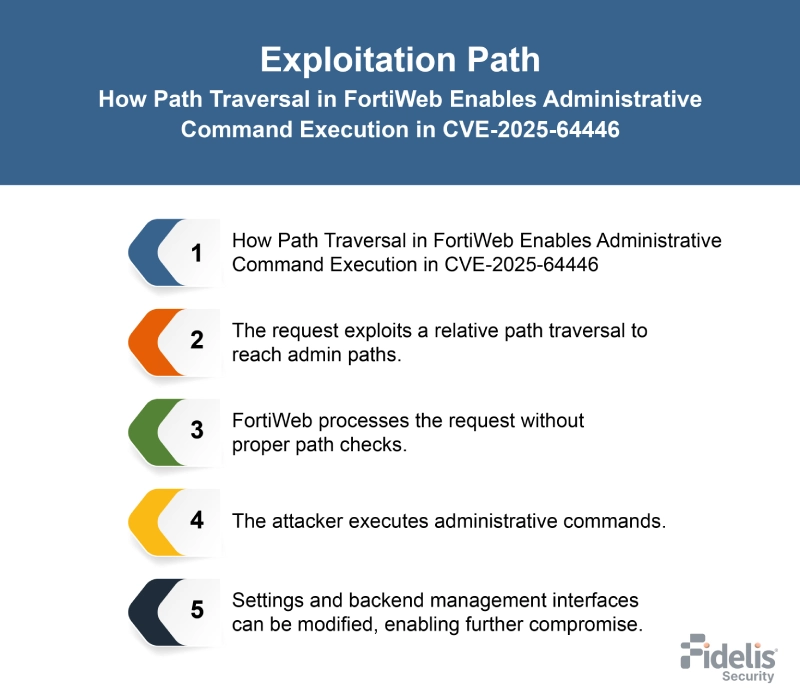
How Does the CVE-2025-64446 Exploit Work?
The attack typically follows these steps:
What Causes CVE-2025-64446?
Vulnerability Root Cause:
This weakness arises from insufficient path handling in FortiWeb’s processing of HTTP and HTTPS requests. The system does not properly normalize user‑controlled paths, allowing traversal sequences to bypass expected directory restrictions. Because of this, crafted requests can reach internal administrative endpoints and trigger high‑privilege actions without authentication.
How Can You Mitigate CVE-2025-64446?
If immediate patching is delayed or not possible:
- Disable public HTTP/HTTPS administrative access.
- Restrict management interfaces so they are reachable only from trusted internal networks.
- Apply firewall rules to limit access to admin ports.
- Monitor logs for traversal-like patterns or unexpected administrative command activity.
Which Assets and Systems Are at Risk?
Asset Types Affected:
- FortiWeb Appliances – All impacted versions (8.0.0–8.0.1, 7.6.0–7.6.4, 7.4.0–7.4.9, 7.2.0–7.2.11, 7.0.0–7.0.11).
- FortiWeb Management Interfaces – Including the Manager panel & websocket command-line interface.
- Web Application Firewall Deployments – Since FortiWeb is used to secure web applications and APIs.
Business-Critical Systems at Risk:
- FortiWebProtected Environments – Because attackers can run administrative commands on the device.
- Administrative Configurations – Risk of unauthorized admin account creation or configuration changes.
- Security Controls – As FortiWeb protections can be undermined if the appliance is compromised.
Exposure Level:
- InternetFacing HTTP/HTTPS Interfaces – Explicitly highlighted as highrisk and recommended to be disabled until patched.
- Systems Attacked at Scale – Multiple references confirm widespread exploitation of exposed FortiWeb appliances worldwide.
- Environments with Unpatched FortiWeb Versions – Particularly those reachable over the network without authentication.
Remediation & Response
Remediation Timeline:
- Immediate (0–2 hrs): Disable HTTP/HTTPS on internet-facing FortiWeb management interfaces.
- Within 24 hrs: Upgrade all FortiWeb systems to patched versions: 8.0.2, 7.6.5, 7.4.10, 7.2.12, or 7.0.12.
- Within 48 hrs: Review system logs for any unauthorized administrative accounts or unusual activity.
Rollback Plan:
- If an upgrade causes operational issues, temporarily restrict management access to trusted networks and restore configurations from known good backups.
- Document rollback steps including version details, date/time, and responsible personnel.
Incident Response Considerations:
- Investigate newly created administrative accounts (e.g., “Testpoint,” “trader,” “trader1”) and reset credentials if necessary.
- Collect FortiWeb logs and configurations to detect exploitation attempts.
- Conduct a full review of WAF rules and system settings to ensure integrity after patching.
- Monitor for continued anomalous activity and validate that the patch fully blocks known exploit paths.
Where Can I Find More Information on CVE-2025-64446?
CVE References:
- ^NVD – CVE-2025-64446
- ^CVE-2025-64446 FortiWeb Zero-Day Exploited | Tenable®
- ^Fortinet Releases Security Advisory for Relative Path Traversal Vulnerability Affecting FortiWeb Products | CISA
- ^CVE-2025-64446 – Fortinet FortiWeb Path Traversal Vulnerability – [Actively Exploited]
- ^AL25-017 – Vulnerability impacting Fortinet FortiWeb – CVE-2025-64446 – Canadian Centre for Cyber Security
CVSS Breakdown Table
| Metric | Value | Description |
|---|---|---|
| Base Score | 9.8 | Critical severity indicating high impact and exploitability |
| Attack Vector | Network | Exploitable remotely over HTTP/HTTPS without local access |
| Attack Complexity | Low | Straightforward exploitation; no special conditions required |
| Privileges Required | None | No authentication or elevated privileges needed |
| User Interaction | None | No user action required for exploitation |
| Scope | UnChanged | Exploitation impacts only the vulnerable FortiWeb component |
| Confidentiality Impact | High | Successful exploit can expose sensitive configuration and data |
| Integrity Impact | High | Exploit can allow unauthorized modification of configuration or commands |
| Availability Impact | High | Exploit may allow administrative actions affecting system availability |