

Summary
CVE-2025-41237 is a critical integer underflow in VMware’s VMCI that lets a guest VM admin execute code as the VMX process on the host. On ESXi, impact is contained within the VMX sandbox, while on Workstation and Fusion it can lead to full host code execution. Affected products include ESXi (7.x, 8.x), Workstation 17.x, Fusion 13.x, VMware Tools (11.x–13.x), Cloud Foundation, vSphere Foundation, and Telco Cloud Platform. Patches such as ESXi80U3f-24784735, ESXi70U3w-24784741, Workstation Pro 17.6.4, Fusion 13.6.4, and VMware Tools 13.0.1.0 address the flaw. Immediate updates are strongly advised to prevent VM escape and host compromise.
Urgent Actions Required
- Apply security updates: ESXi80U3f-24784735, ESXi70U3w-24784741, Workstation Pro 17.6.4, Fusion 13.6.4, VMware Tools 13.0.1.0.
- Restrict administrative access within guest VMs until patches are applied.
- Audit VMware environments for unauthorized admin activity.
Which Systems Are Vulnerable to CVE-2025-41237?
Technical Overview
- Vulnerability Type: Integer Underflow in VMCI (Out-of-Bounds Write)
-
Affected Software/Versions:
- VMware ESXi 7.x, 8.x
- VMware Workstation 17.x
- VMware Fusion 13.x
- VMware Tools 11.x.x – 13.x.x
- VMware Cloud Foundation 4.5.x, 5.x, 9.0.0.0
- VMware vSphere Foundation 9.0.0.0
- VMware Telco Cloud Platform 2.x – 5.x
- VMware Telco Cloud Infrastructure 2.x, 3.x
- Attack Vector: Local
- CVSS Score: 9.3
- CVSS Vector: CVSS:3.1
-
CVSS Vector: CVSS:3.1
- Attack Vector: Local
- Attack Complexity: Low
- Privileges Required: None
- User Interaction: None
- Scope: Changed
- Confidentiality Impact: High
- Integrity Impact: High
- Availability Impact: High
- Patch Availability: Yes, available[4] [5]
How Does the CVE-2025-41237 Exploit Work?
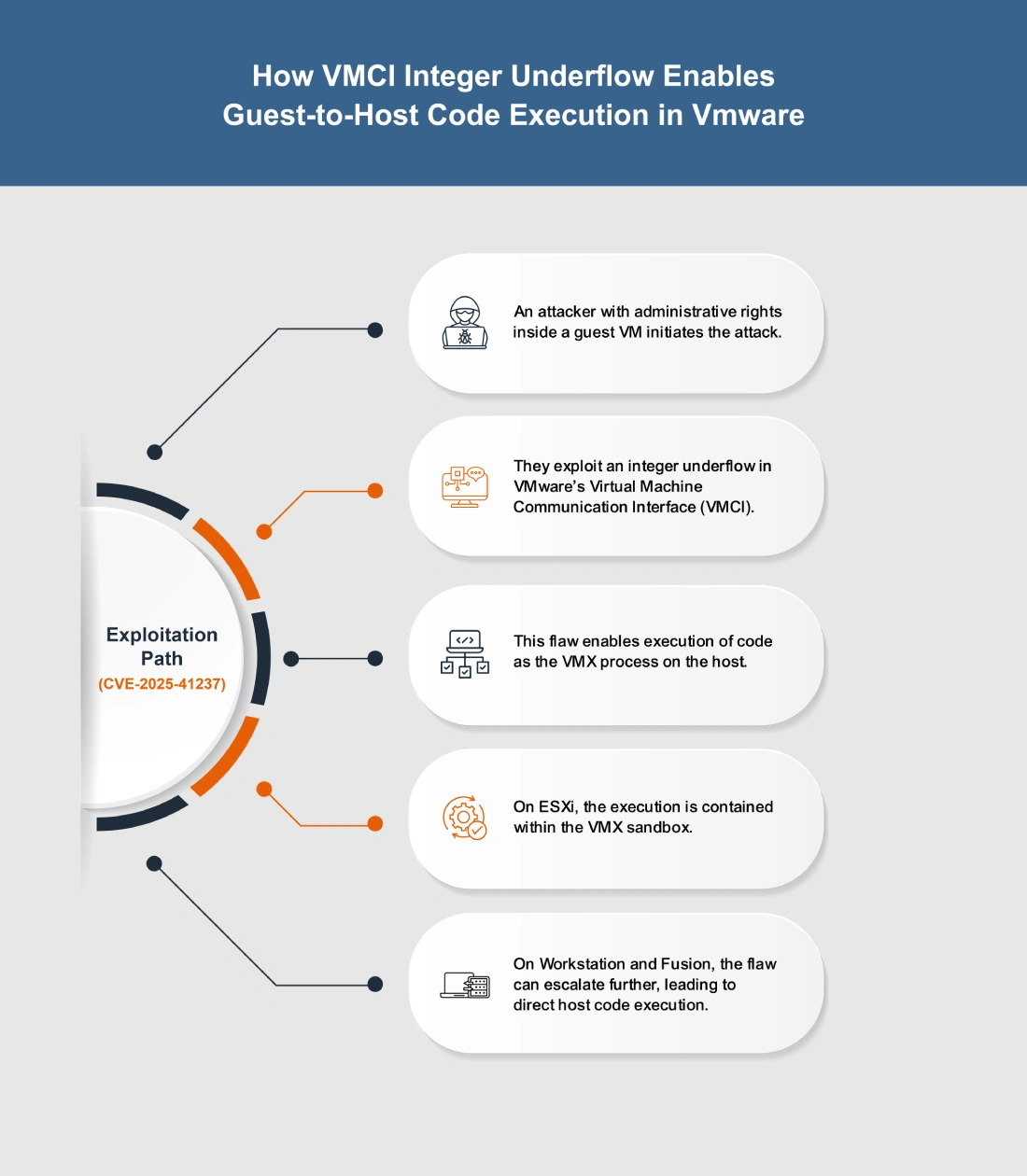
The attack typically follows these steps:
What Causes CVE-2025-41237?
Vulnerability Root Cause:
The flaw arises from an integer underflow in the Virtual Machine Communication Interface (VMCI). This arithmetic error occurs when calculations involving integer values are not properly validated, resulting in memory corruption. By exploiting this weakness, a malicious actor with administrative rights in a guest VM can manipulate memory operations and escalate privileges to run code as the VMX process on the host.
How Can You Mitigate CVE-2025-41237?
If immediate patching is delayed or not possible:
- Restrict guest VM administrative privileges to limit potential abuse of the VMCI flaw.
- Audit and review virtual hardware configurations, especially VMCI usage, to reduce unnecessary exposure.
- Harden access controls on guest environments to minimize the risk of exploitation until official patches are applied.
Which Assets and Systems Are at Risk?
Asset Types Affected:
- Virtualization Platforms – VMware ESXi (7.x, 8.x)
- Desktop Virtualization – VMware Workstation 17.x, VMware Fusion 13.x
- VMware Tools – Versions 11.x.x through 13.x.x
- Integrated Solutions – VMware Cloud Foundation (4.5.x, 5.x, 9.0.0.0), vSphere Foundation (9.0.0.0)
- Telco Environments – VMware Telco Cloud Platform (2.x–5.x), VMware Telco Cloud Infrastructure (2.x, 3.x)
Business-Critical Systems at Risk:
- Multi-tenant or service provider environments – Higher exposure due to shared infrastructure and potential VM escape.
- Cloud and VDI deployments – Risk of host compromise affecting multiple workloads.
Exposure Level:
- Guest VMs with admin access – Exploitation requires administrative rights inside the virtual machine.
- Environments using VMCI – Systems actively relying on VMCI device functionality are at greatest risk.
Will Patching CVE-2025-41237 Cause Downtime?
Patch application impact: Low. Fixes are available in ESXi80U3f-24784735, ESXi70U3w-24784741, Workstation Pro 17.6.4, Fusion 13.6.4, and VMware Tools 13.0.1.0. Updates may require host or VM reboots, causing brief downtime, so plan deployment carefully in production.
Mitigation (if immediate patching is not possible): Limiting guest VM admin rights and auditing virtual hardware can reduce risk but do not fully protect against exploitation. Full security requires applying patches, even if short maintenance downtime is unavoidable.
How Can You Detect CVE-2025-41237 Exploitation?
Exploitation Signatures:
- Attempts by a guest VM admin triggering abnormal VMCI activity.
- Out-of-bounds memory writes linked to the VMX process.
- VM restarts or instability after unusual guest-to-host communication.
MITRE ATT&CK Mapping:
Indicators of Compromise (IOCs/IOAs):
- VMX process crashes or unexpected termination on ESXi, Workstation, or Fusion.
- Error logs tied to VMCI communication failures.
- Anomalous memory corruption or sandbox exceptions within ESXi hosts.
Behavioral Indicators:
- Elevated host instability when specific guest VMs are active.
- Resource spikes or irregular host behavior following VMCI operations.
- Fusion/Workstation hosts experiencing repeated errors during VM execution.
Alerting Strategy:
- Priority: Critical – any anomalies in VMCI traffic or VMX behavior should trigger alerts.
- Flag recurring VM crashes or unexpected reboots as potential exploitation attempts.
- Monitor for repeated VMX sandbox exceptions that could signal exploitation.
Remediation & Response
Patch/Upgrade Instructions:
Remediation Timeline
- Immediate (0–2 hrs): If patching is not yet possible, limit exposure by restricting untrusted VM workloads where VMCI is enabled.
- Within 8 hrs: Apply patches to production ESXi hosts and desktop hypervisors running exposed versions.
- Within 24 hrs: Ensure all VMware Tools instances are updated across guest VMs. Validate that patched builds are active in both production and staging environments.
Rollback Plan:
- If the patch introduces operational instability, roll back to the last known stable ESXi/Workstation/Fusion version and maintain host isolation controls to reduce risk.
- Record rollback details (time, version, systems affected) in your change-management log.
Incident Response Considerations:
- Containment: Isolate any VM or host that shows signs of instability, VMX crashes, or abnormal memory behavior following suspicious VMCI activity.
- Forensic Collection: Gather VMkernel logs, VMX logs, and guest-to-host communication traces to check for indications of VMCI abuse or memory corruption events.
- Post-Patch Validation: After updates, confirm VMX stability, check for absence of repeated VM crashes, and monitor VMCI-related error logs to ensure the fix is effective.
Where Can I Find More Information on CVE-2025-41237?
- ^NVD – CVE-2025-41237
- ^CVE-2025-41237 – Exploits & Severity – Feedly
- ^CVE-2025-41237 – Vulnerability Details – OpenCVE
- ^VMware ESXi 8.0 Update 3f Release Notes
- ^VMware Workstation 17.6.4 Pro Release Notes
- ^Exploitation for Client Execution, Technique T1203 – Enterprise | MITRE ATT&CK®
- ^Execution, Tactic TA0002 – Enterprise | MITRE ATT&CK®
- ^Privilege Escalation, Tactic TA0004 – Enterprise | MITRE ATT&CK®
CVSS Breakdown Table
| Metric | Value | Description |
|---|---|---|
| Base Score | 9.3 | Critical severity vulnerability with significant impact on confidentiality, integrity, and availability |
| Attack Vector | Local | Exploitation requires local access from within a guest VM |
| Attack Complexity | Low | The attack does not require special conditions; exploitation is straightforward |
| Privileges Required | None | No elevated privileges inside the guest are required to exploit the flaw |
| User Interaction | None | No user action (clicks or input) is needed for exploitation |
| Scope | Changed | Successful exploitation can impact resources beyond the vulnerable VM process |
| Confidentiality Impact | High | Exploit could expose sensitive host-level data |
| Integrity Impact | High | Exploit could allow unauthorized modification or code execution |
| Availability Impact | High | Exploit could fully compromise host stability and availability |