
Summary
CVE-2025-40599 is a critical file upload flaw in SonicWall SMA 100 series (SMA 210, 410, 500v) firmware 10.2.1.15-81sv and earlier. It lets attackers with admin access upload malicious files, risking full device takeover. Attackers have used stolen credentials to exploit this in ongoing OVERSTEP malware campaigns. SonicWall urges immediate update to firmware 10.2.2.1-90sv or later and recommends resetting passwords, reinitializing OTP, enabling MFA, restricting remote access, enabling WAF, and checking logs for signs of compromise.
Urgent Actions Required
- Update SonicWall SMA 100 devices (210, 410, 500v) to firmware 10.2.2.1-90sv or newer right away.
- Check device logs and connection history for signs of compromise or unauthorized access.
- Reset all passwords and set up OTP again for all users and admins.
- Require Multi-Factor Authentication (MFA) for all accounts.
- Disable remote management access on external-facing interfaces to reduce attack surface.
- Enable the Web Application Firewall (WAF) on devices for additional protection.
Which Systems Are Vulnerable to CVE-2025-40599?
Technical Overview
- Vulnerability Type: Authenticated Arbitrary File Upload leading to Remote Code Execution
-
Affected Software/Versions:
- SonicWall SMA 100 Series (SMA 210, 410, 500v)
- Firmware versions 10.2.1.15-81sv and earlier
- Attack Vector: Network (Web Management Interface)
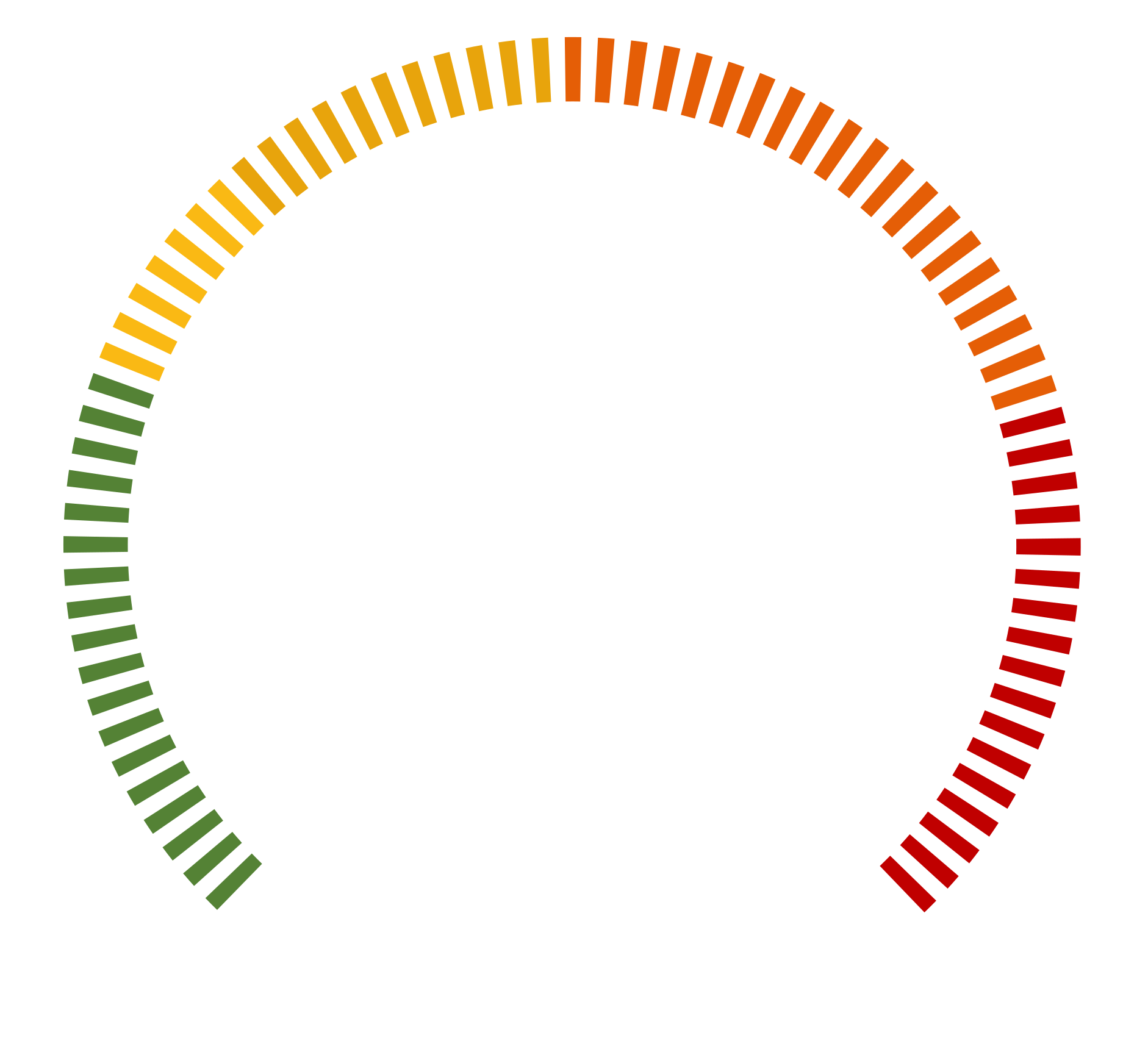
- CVSS Score: 9.1
-
Exploitability Score:
- Attack Vector: Network
- Attack Complexity: Low
- Privileges Required: High (Administrative Access)
- User Interaction: None
- Patch Availability: Yes, fixed in firmware version 10.2.2.1-90sv and later[1]
How Does the CVE-2025-40599 Exploit Work?
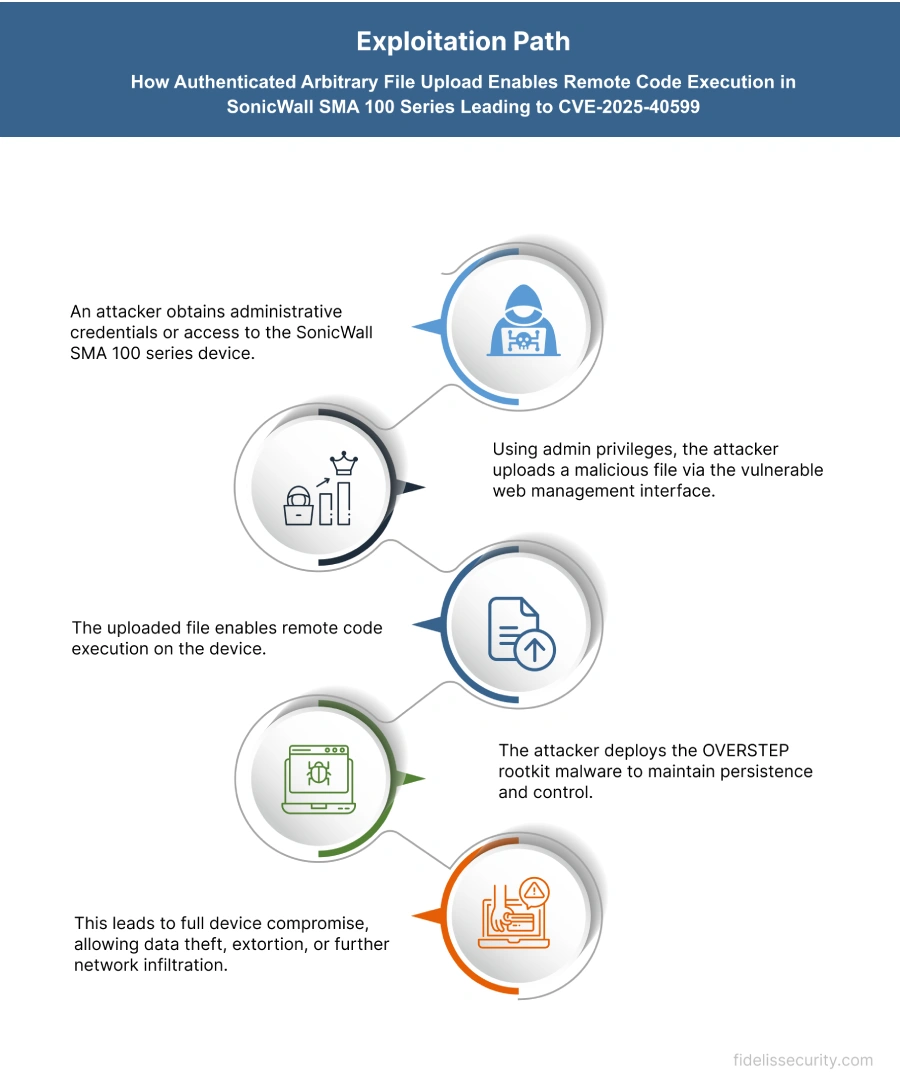
The attack typically follows these steps:
What Causes CVE-2025-40599?
Vulnerability Root Cause:
This vulnerability happens because the SonicWall SMA 100 series doesn’t properly check files uploaded through its web management interface. Admin users can upload any file without restrictions. Attackers who have stolen or valid admin credentials can upload harmful files that run remotely, letting them take full control of the system.
How Can You Mitigate CVE-2025-40599?
If immediate patching is delayed or not possible:
- Restrict remote management access on external-facing interfaces (e.g., X1) to reduce exposure.
- Reset all passwords and set up OTP again for all users and admins.
- Turn on Multi-Factor Authentication (MFA) to block unauthorized access.
- Enable the Web Application Firewall (WAF) on SMA 100 devices for extra security.
- Review appliance logs and connection history for anomalies and indicators of compromise (IoCs), as detailed by Google’s Threat Intelligence Group.
- For SMA 500v virtual appliances, consider backing up the OVA, exporting configurations, redeploying a clean OVA, and restoring configurations to eliminate potential persistence mechanisms.
Which Assets and Systems Are at Risk?
Asset Types Affected:
- SonicWall SMA 100 Series Appliances – Including SMA 210, 410, and 500v running firmware 10.2.1.15-81sv or earlier
- Remote Access Infrastructure – Devices acting as secure gateways for VPN and remote work connectivity
- Web Management Interfaces – Admin panels used for configuring and maintaining SMA 100 series appliances
Business-Critical Systems at Risk:
- Administrative Consoles – If compromised, attackers can gain full control over network access and device configurations
- Secure Remote Access Platforms – Used by employees, vendors, or contractors to access internal systems
- Sensitive Perimeter Devices – Placed at the edge of the network, their compromise could lead to full network infiltration
Exposure Level:
- Internet-facing SMA Devices – Especially those with remote management interfaces exposed on public IPs
- Fully Patched Systems – If credentials were stolen during prior breaches, attackers can still regain access even post-patch
- Virtual Appliances (SMA 500v) – May retain persistence mechanisms if not rebuilt from a clean OVA after compromise
Will Patching CVE-2025-40599 Cause Downtime?
Patch application impact: Low. Update SMA 100 series (SMA 210, 410, 500v) to firmware 10.2.2.1‑90sv or later. The process is straightforward with minimal downtime.
Mitigation (if immediate patching is not possible):
- Disable remote management on external-facing interfaces.
- Reset all passwords and reinitialize OTP.
- Enable MFA and Web Application Firewall (WAF).
- Review logs for unusual access or compromise signs.
- For SMA 500v: consider redeploying a clean OVA and restoring backups.
How Can You Detect CVE-2025-40599 Exploitation?
Exploitation Signatures:
- Attacker uses stolen admin credentials to access SMA 100 series web interface.
- Uploads malicious files to gain remote code execution.
- Installs OVERSTEP rootkit by modifying /etc/ld.so.preload, rc.fwboot, and INITRD image.
- Clears logs (httpd.log, http_request.log) to hide activity.
Indicators of Compromise (IOCs/IOAs):
- Unexpected files in /cf, /usr/lib, or ld.so.preload.
- Altered boot script: /etc/rc.d/rc.fwboot.
- Missing or wiped logs (e.g., inotify.log).
- Web requests containing dobackshell or dopasswords commands.
Remediation & Response
Patch/Upgrade Instructions:
-
Upgrade SMA 100 series devices to firmware version 10.2.2.1-90sv or higher to remediate the vulnerability.
Official advisory: SonicWall PSIRT SNWLID-2025-0014
Remediation Timeline:
- Immediate (0–24 hrs): Review logs and restrict remote access.
- Within 48 hrs: Upgrade all affected devices to fixed firmware version 10.2.2.1-90sv or higher.
Rollback Plan:
- Revert to the previously stable firmware if the patch causes issues.
- Document rollback steps including date, time, responsible personnel, and version details.
Incident Response Considerations:
- Isolate affected devices to prevent further compromise.
- Collect forensic data such as appliance logs and connection histories to detect unauthorized access.
- Investigate for evidence of stolen credentials or unusual activity.
- Engage SonicWall Support for assistance if compromise is confirmed.
Compliance & Governance Notes
Audit Trail Requirement:
- Review appliance logs and connection history for anomalies and indicators of compromise.
- Check for unauthorized access and suspicious activity.
Policy Alignment:
- Enforce Multi-Factor Authentication (MFA) for all users.
- Reset all passwords and reinitialize One-Time Password (OTP) bindings for users and administrators.
- Disable remote management access on external-facing interfaces to reduce attack surface.
- Enable the Web Application Firewall (WAF) on the device.
- Contact SonicWall Support immediately if compromise is suspected.
Where Can I Find More Information on CVE-2025-49706?
- ^SonicWall PSIRT SNWLID-2025-0014
- ^An authenticated arbitrary file upload vulnerability… · CVE-2025-40599 · GitHub Advisory Database · GitHub
- ^CVE-2025-40599 : An authenticated arbitrary file upload vulnerability exists in the SMA 100 serie
- ^CVE-2025-40599 – SonicWall SMA Arbitrary File Upload Vulnerability
- ^NVD – CVE-2025-40599
CVSS Breakdown Table
| Metric | Value | Description |
|---|---|---|
| Base Score | 9.1 | Critical severity indicating high impact and exploitability |
| Attack Vector | Network | Exploitable remotely via network (web management interface) |
| Attack Complexity | Low | Low complexity; attackers with admin privileges can exploit without special conditions |
| Privileges Required | High | Administrative privileges required for exploitation |
| User Interaction | None | No user interaction needed once admin access is obtained |
| Scope | Changed | Exploitation can affect broader system security beyond the vulnerable component |
| Confidentiality Impact | High | Successful exploit can lead to full system compromise and data exposure |
| Integrity Impact | High | Exploit allows unauthorized modification of system files and settings |
| Availability Impact | High | Potential for full system takeover, impacting availability significantly |