
Key Takeaways
- Trojan horse malware only works if someone lets it in. There's no self-replication and no autonomous spread, just a convincing disguise and one click.
- Modern trojans like Qakbot don’t just steal data. They sell network access to ransomware groups, turning a single opened attachment into a much bigger breach.
- Common types include backdoor trojans, remote access trojans, banking trojans, downloaders, rootkits, and ransomware trojans, each built around a different payload.
- Detection keeps getting harder. Polymorphic code, fileless execution, and living-off-the-land techniques all exist to give antivirus nothing consistent to flag.
- Behavioral detection catches what signature matching misses, since what a trojan does after execution is much harder to disguise than the file itself.
No single control stops trojans reliably. Patching, email hygiene, and network-level visibility all play a role, and Fidelis Network® is built to catch what gets through once a trojan is past the perimeter. Most people assume malware eventually gets caught. A log entry shows up, or something looks off on screen, sooner or later. Trojans break that assumption on purpose. They’re built to stay quiet, right up until the disguise has already worked.
QakBot still shows up often in ransomware investigations, and for good reason. It started in 2008 as an ordinary banking trojan, then became something bigger: an entry point other criminals paid to use. It spread through phishing emails, often hijacking a real email thread so the attachment looked like part of a conversation that was already underway. Once someone opened it, QakBot handed that foothold to ransomware groups. By the time the FBI dismantled its infrastructure in 2023, it had helped facilitate more than 40 ransomware attacks and an estimated $58 million in ransom payments. Most trojans still get in that same way, riding on something that already looks trustworthy.
A trojan doesn’t force its way onto a device. It doesn’t need to be sophisticated, either. It just needs someone to open the door for it. Antivirus was built to catch known bad files, not convincing disguises. Trojans slip through because of that gap, not because the tools are broken.
The rest of this article breaks all of that down, starting with what trojan horse malware actually is.
What is Trojan Horse Malware?
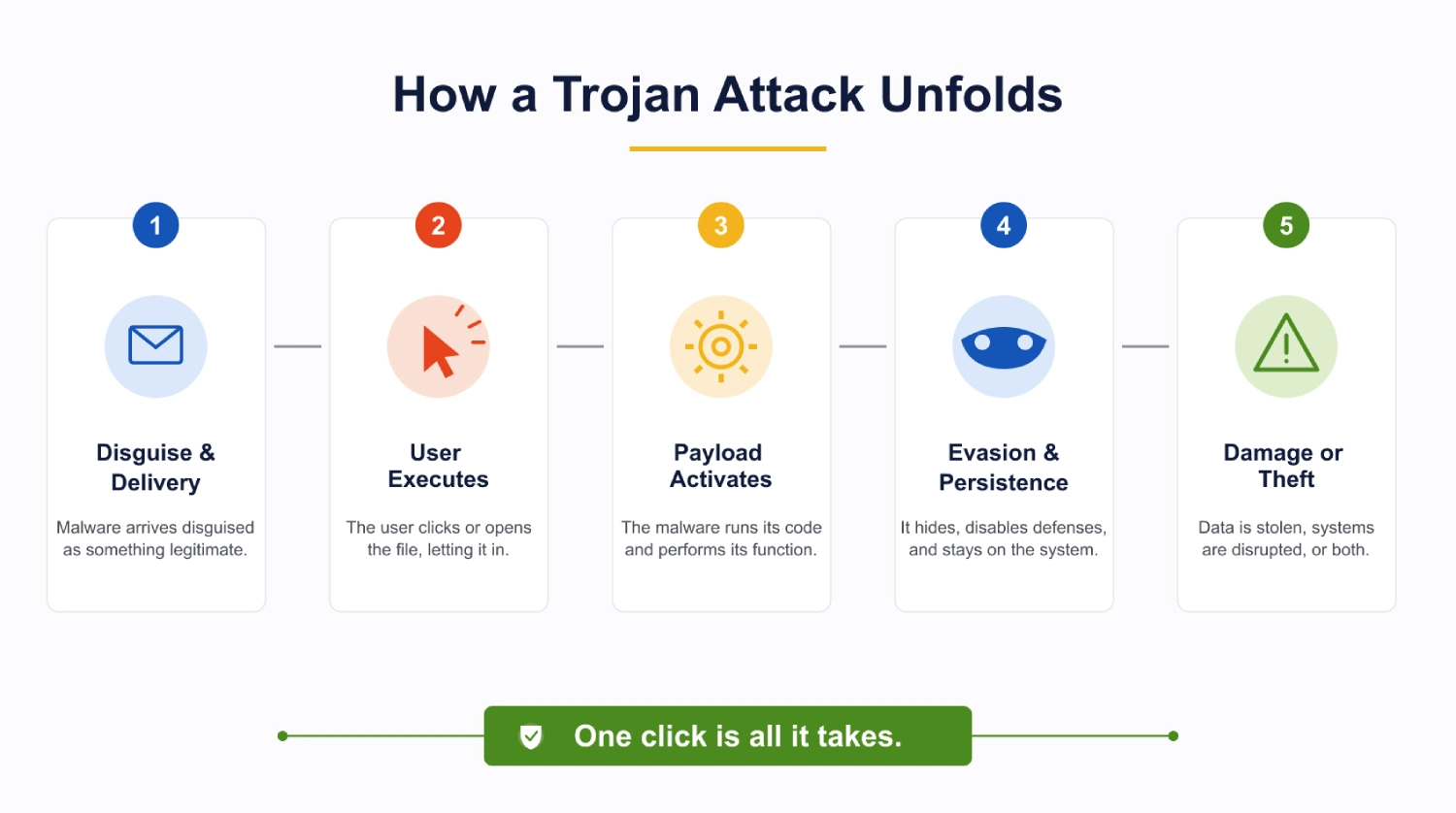
Trojan horse malware disguises itself as something legitimate: an invoice, a software update, a cracked app, whatever gets someone to click without stopping to think. It doesn’t force its way in. It talks its way in. Once it’s installed, it does whatever it was built to do. A keylogger can record every keystroke within seconds. Other payloads take their time, a downloader might sit quiet for days before pulling in something worse, spyware can run for months without tripping a single symptom.
Calling it a trojan horse virus is technically wrong, though the phrase stuck anyway. It’s worth clearing up, since the mix-up is common. Viruses infect existing files and copy themselves without help. A trojan skips all of that. It’s closer to a delivery method than an infection and getting someone to run it is the whole job. There’s no fixed job description once it’s inside, either. The same code shows up as spyware in one campaign and a dormant backdoor in the next, and packaging is what decides which.
- What data has been potentially exposed?
- Incursion detection and Persistence detection
- How should I respond?
Trojan Horse History: Where the Name Comes From
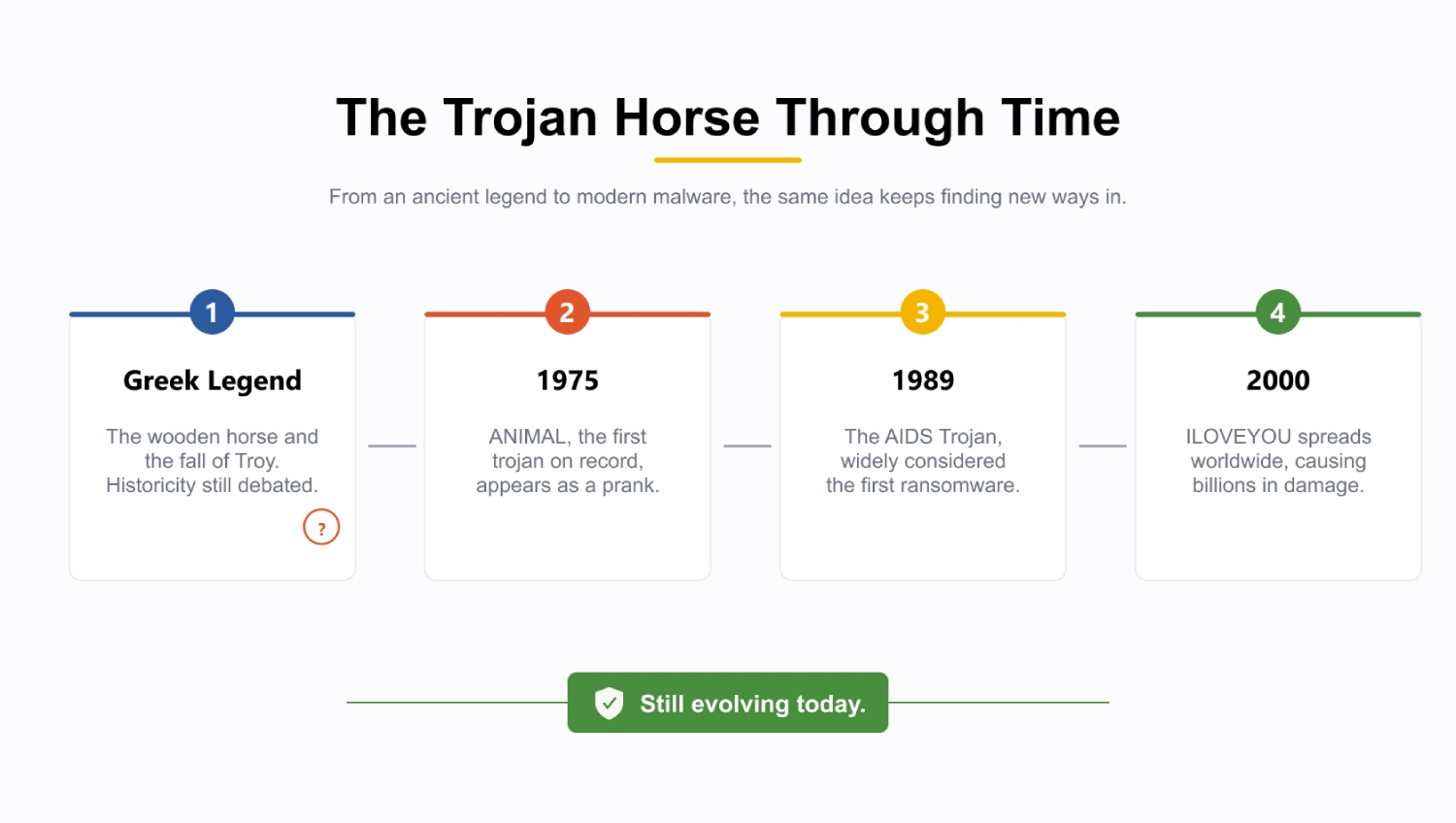
The name comes from Greek legend; a wooden horse packed with soldiers and wheeled inside Troy’s gates as a supposed peace offering. Historians still argue about whether any of it actually happened. The story survives only through Homer and Virgil, both writing centuries after the fact, and no dig at the presumed site of Troy has ever turned up anything resembling a horse.
Credit for creating trojan horse malware, the computing kind rather than the myth, generally goes to a 1975 prank program called ANIMAL, the first trojan on record. By 1989 the same trick had turned into the AIDS Trojan, widely considered the first ransomware, mailed out on floppy disks to attendees of a World Health Organization conference. The technique itself is older than most people assume. It predates the modern internet by roughly two decades. “Operation trojan horse” gets used loosely today too, as a stand-in for campaigns built on that same idea, earn trust first, do the damage later, though it’s not tied to any one specific attack the way the AIDS Trojan is.
How Does Trojan Horse Malware Work?
Most trojan attacks don’t need much technical skill behind them. They need a disguise that works, and a moment where someone stops paying attention.
An invoice shows up attached to an email, supposedly from a vendor the company deals with regularly. It gets opened without much thought, because nothing about it raises a flag. That single click does all the work a trojan needs; there’s no way in without it, which is the one thing that separates it from a worm. After that, the malware runs whatever code it was built with. Sometimes that’s a backdoor left open quietly in the background. Sometimes it’s a keylogger picking up everything typed from then on. Encryption can start within minutes if that’s what it was designed to do. Whatever it is, the trojan usually tries to cover its tracks next, occasionally disabling security software directly, so it can keep running unnoticed for as long as the disguise holds.
Trojan Horse vs. Virus vs. Worm
Malware, worms, and trojan horses tend to get talked about like they’re interchangeable, and they’re really not.
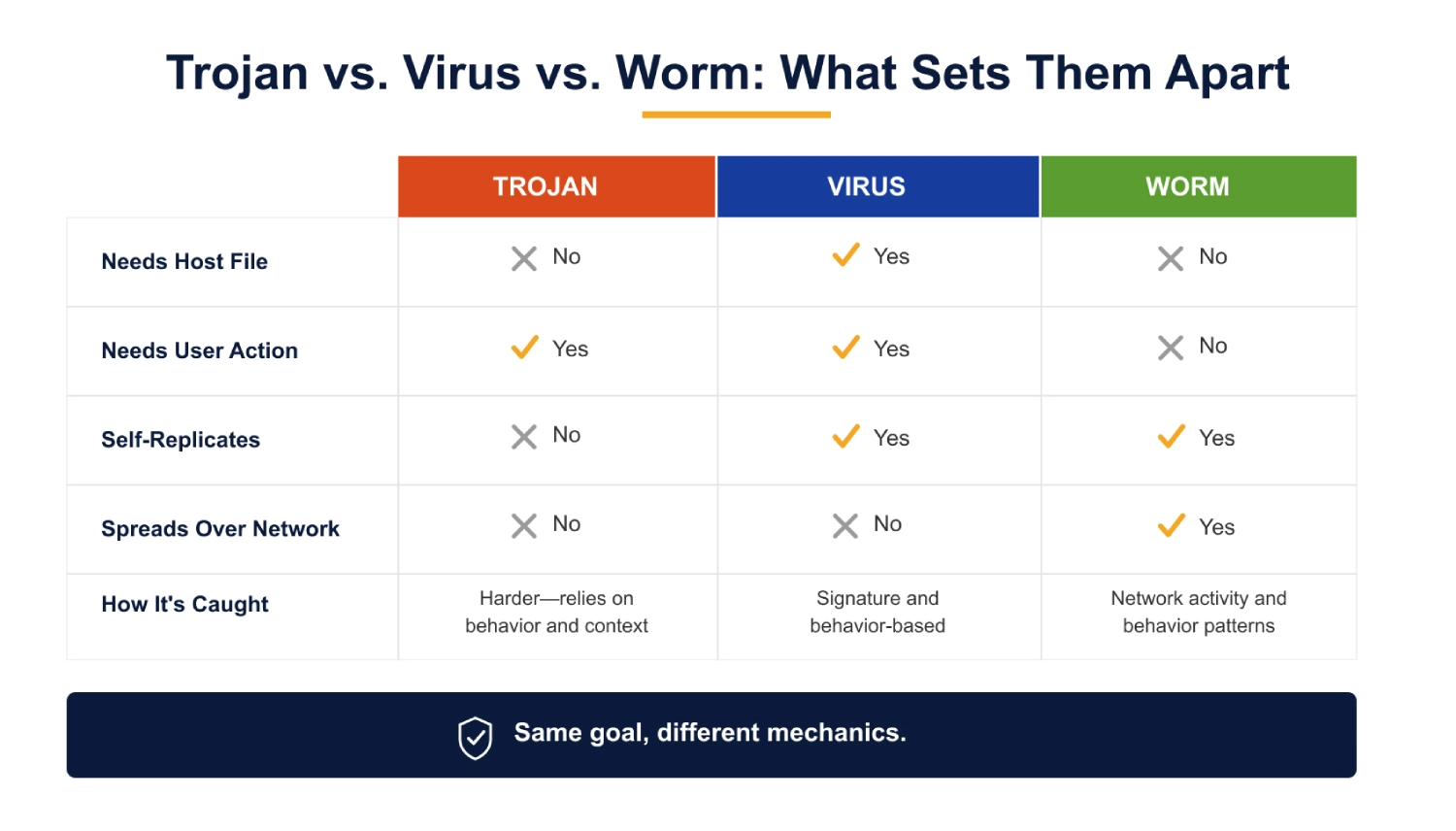
A virus needs a host, some existing file it can hide inside and hitch a ride with, so it only moves once that file gets opened somewhere else.
A worm skips all of that. It just crawls from machine to machine across a network on its own, no file required and nobody needing to click anything to keep it moving.
A trojan needs neither. It depends entirely on someone being fooled into running it, and that’s part of why it’s often the hardest of the three for signature-based tools to catch.
There’s no repeating pattern to fingerprint, just a disguise and whatever’s behind it. Whether something counts as a trojan horse virus or malware of some other kind usually comes down to that one detail: it had to trick someone into running it, rather than sneaking in or spreading on its own.
Common Types of Trojan Horse Malware (With Examples)
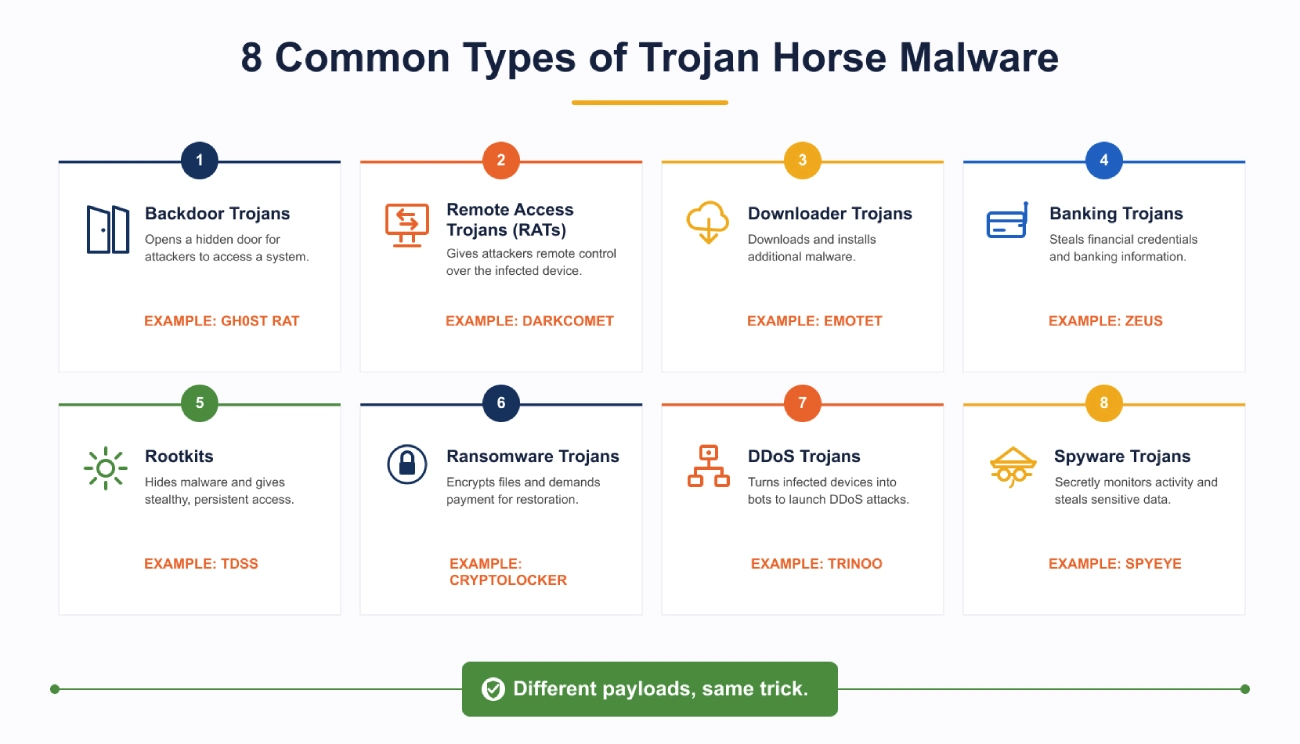
A handful of categories cover most of what’s actually out there. Backdoor trojans and remote access trojans (RATs) give an attacker ongoing access to a system, sometimes extending to a webcam, keystrokes, or files, all without the owner knowing. Downloader trojans, Emotet being the standard example, exist to pull in more malware after the initial infection. Banking trojans like Zeus go after financial credentials directly. Rootkits are built purely to hide themselves and anything running alongside them.
Other types exist to disrupt rather than steal. Ransomware trojans, the model Cryptolocker popularized in 2013, encrypt files and hold the key for ransom. DDoS trojans fold infected machines into a botnet. Some trojans are built specifically around erasing or overwriting data instead of stealing it, usually to cover an attacker’s tracks. Trojan horse spyware malware sits at the quieter end of the spectrum, logging and transmitting data in the background with no visible symptoms at all.
Zeus, Emotet, Trickbot, and the AIDS Trojan each show a different version of the same basic idea.
How Trojan Horse Malware Evades Detection (and What Actually Catches It)
A Trojan relies on deception to get in. Once it’s running, though, the disguise starts to matter less than what it actually does.
Antivirus tools still mostly work off pattern matching: a scanner keeps a library of known malware signatures and checks incoming files against it. Attackers know this, so a good chunk of Trojan development effort goes into never producing a signature that matches anything on file. Polymorphic code is one way to pull that off. The file rewrites its own code with every execution, so one copy doesn’t resemble the last even though it’s doing the same thing underneath. Fileless trojans solve the same problem differently. Instead of writing anything to disk that could get scanned, they run entirely in memory or hijack a tool the system already trusts, like PowerShell, so there’s no file left behind to fingerprint in the first place.
Timing plays a role too. Packed and encrypted payloads stay unreadable until they unpack themselves at runtime, usually well after any scheduled scan has already come and gone, and some trojans just wait it out, sitting dormant for a set number of reboots or only firing outside business hours when nobody’s watching as closely.
None of that makes a trojan invisible forever, though. A file can dodge every signature check and still leave a trail once it runs: unusual outbound connections, a process spawning something it has no business spawning, and credentials being read from places they shouldn’t be touched. That’s the shift detection has had to make. Instead of asking what a file looks like, security tools increasingly ask what it’s doing, and that’s much harder for a trojan to fake.
- Detect and Correlate Weak Signals
- Active Threat Detection
- Evaluate Findings Against Known Attack Vectors
- Proactively Secure Systems
A Real-World Example of Trojan Horse Defense
There’s a legal wrinkle worth knowing too. “Trojan horse defense” describes an actual courtroom strategy, a defendant arguing that malware, not them, was responsible for illegal activity found on their device. Aaron Caffrey is still the case people point to, a British teenager acquitted in 2003 over a denial-of-service attack that knocked out the Port of Houston’s computer systems in 2001. His defense argued a trojan, possibly one built to erase itself after use, had taken over his laptop and launched the attack on its own. Investigators never actually found the trojan, only the attack tools it supposedly used, and the jury believed the defense anyway.
That case says something worth remembering: a trojan attack doesn’t just cost money or data. Sometimes it makes it genuinely hard to prove what actually happened on a system afterward, and attackers count on exactly that kind of doubt.
How to Prevent Trojan Horse Malware
Trojan horse malware works by fooling a person, or by slipping past a tool that only watches for threats it already recognizes. Real prevention has to cover both. A lot of the easy entry points close on their own once people default to suspicion with attachments and links, stick to official download sources, and keep systems patched.
Antivirus alone isn’t enough anymore. Behavioral detection catches plenty that plain signature matching misses, and it’s worth layering in rather than depending on one tool. Keeping admin rights limited helps too, so a trojan that does get through has less room to do damage, and the same goes for multi-factor authentication wherever it’s available. None of this replaces regular training. Most infections still trace back to somebody clicking the wrong thing, and a single onboarding session won’t fix that.
None of that catches everything. Whatever slips past those controls still has to communicate outward or move across the network at some point, and that’s usually visible even when the device itself looks completely fine.
Where Fidelis Network Fits In
Fidelis Network®, Fidelis Security’s network detection and response platform, picks up where that shift in thinking leads. It scores traffic in real time using behavioral analytics across more than 300 metadata attributes, mapped against the MITRE ATT&CK framework, so it’s watching what a trojan does rather than waiting for a signature to match something known. Command-and-control traffic and lateral movement, the behavior a trojan generates once it’s already past the perimeter, get seen and flagged at this stage instead of slipping through.
Full technical detail is in the Fidelis Network datasheet.
Frequently Asked Questions
What is trojan horse malware?
Software disguised as something legitimate, a program, a file, an update, built to get a user to install or run it on their own. Once it’s active, it does whatever the attacker designed it to do, whether that’s spyware, ransomware, a backdoor, or something else entirely.
What's a Trojan horse malware example?
Zeus for banking credential theft, Emotet as a downloader that evolved into a malware delivery network, Cryptolocker for ransomware, and the AIDS Trojan from 1989, generally considered the first of its kind. Each one represents a different type built around a different payload.
Is a trojan horse the same as a virus?
Not technically. Trojans don’t self-replicate or attach to other files the way viruses do, and everything depends on a user taking some action first. “Trojan horse virus” stuck as a phrase anyway, even though it isn’t quite accurate.
How does trojan horse malware spread?
Only through user action. Someone has to download a fake attachment, install cracked software, click a phishing link, or plug in an infected drive.
How can organizations prevent trojan horse malware attacks?
Through layered defense, mostly: patch management, careful email and download habits, least-privilege access, multi-factor authentication, ongoing training, and network-level monitoring that can catch command-and-control traffic even after a trojan clears the endpoint.
Can antivirus software catch every trojan?
Not reliably. Signature-based antivirus struggles against polymorphic code, fileless malware, and encrypted payloads, which is why behavioral detection and network-level visibility, NDR included, have become close to necessary as a second layer.